
Introduction
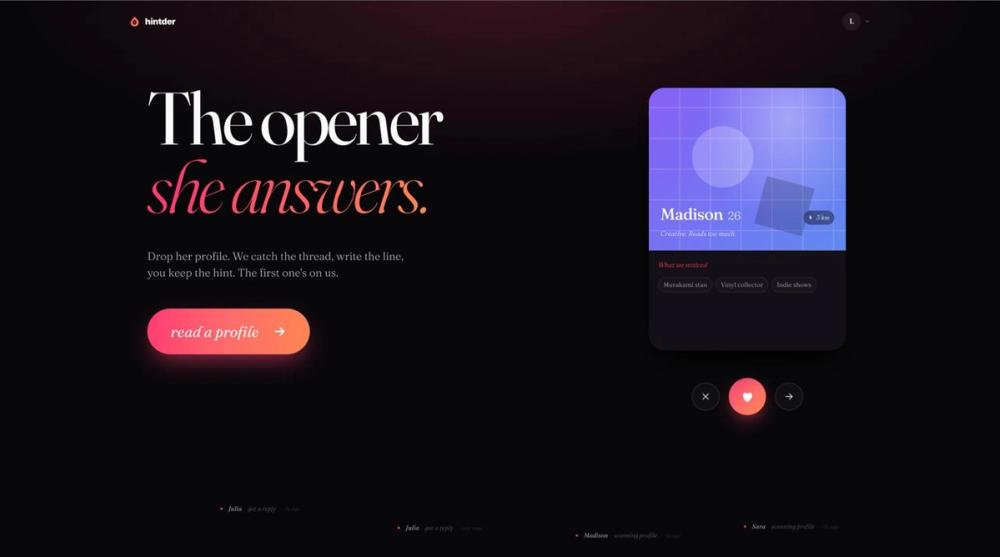
Hintder markets itself as an AI dating wingman: you upload a dating profile screenshot, and the service extracts profile hooks and drafts openers meant to sound personal rather than generic. The public site also describes reply coaching for ongoing conversations. Anyone considering it should read privacy terms around screenshot retention and treat reply outcomes as uncertain-the site itself notes that matches may not respond.
Key Features
- Profile screenshot scanner: Drag a profile onto the scanner; the flow shows what was read, how lines were written, and why they might work.
- Multiple openers per hint: One hint reads one profile and drafts five openers in a chosen tone, according to on-page FAQ copy.
- Reply coaching: Hints can cover reading a profile into openers or coaching your next reply; a few hints are described as enough to carry a match from first message toward a date.
- App-agnostic workflow: Works from screenshots on Tinder, Hinge, Bumble, Coffee Meets Bagel, and similar apps without plugging into those apps directly.
- Tone positioning: Marketing contrasts output with generic AI phrasing-aiming for playful tension and profile-specific details rather than polished "assistant" cadence.
- Guides and stories: Navigation includes Guides and Stories alongside Pricing and sign-in.
Use Cases
People stuck on a first message might use Hintder to turn visible profile details (photos, bio lines, interests) into several opener options to copy into the app. The site's examples contrast weak generic compliments with more specific lines tied to profile hooks.
After a reply, the same hint system is positioned for the "second move" and broader conversation coaching. Users who want occasional help without a forced subscription can use the first free hints; heavier daters may prefer monthly plans with rollover hints on the pricing page.
Pricing
First three hints are free with no card and no signup per homepage and FAQ text; standalone hints do not expire, auto-renew, or roll into a subscription when purchased individually.
The pricing page meta describes monthly subscriptions-Lite, Plus, Pro, and unlimited Ultimate-with unused hints rolling over and cancel anytime. Yearly billing advertises about 15% off versus monthly. Confirm current plan prices, hint counts per tier, and Ultimate "unlimited" boundaries on the live pricing page before subscribing.
User Experience and Support
The core UX is Try free → upload screenshot → review extracted hooks and suggested lines → copy into your dating app. The site shows illustrative before/after message examples (e.g., generic "cute cat" vs. a more specific line).
Support and education routes include Guides, Stories, and FAQ-style sections on the homepage (privacy, apps supported, ChatGPT comparison). Plan FAQ on pricing covers switching plans, monthly vs. yearly, and cancellation. For screenshot handling details, the site points readers to the Privacy Policy.
Technical Details
Hintder is a web service driven by uploaded screenshots; there is no public API, browser extension inventory, or mobile SDK documentation on the fetched pages. Processing appears cloud-based with up to 30 days retention for screenshots to reopen matches, then automatic deletion, with claims that images are not used to train models or sold.
Pros and Cons
Pros
- No dating-app integration required-screenshots keep you in control of which profiles you analyze.
- Five opener variants per profile hint may reduce blank-page friction.
- Free trial hints without payment details for initial testing.
- Subscription hints roll over per pricing messaging, which may suit intermittent use.
- Clear on-page stance on privacy retention window and non-training claim (verify in policy).
Cons
- Replies are not guaranteed; the site explicitly sets expectations when matches do not answer.
- Effectiveness vs. generic chatbots is marketing positioning, not independently verified here.
- Screenshot upload implies sharing others' profile data-users should consider ethics and app terms.
- Technical stack and model details are not disclosed on fetched pages.
FAQ
What is Hintder?
The site describes an AI dating wingman that reads profile screenshots and produces openers, plus coaching for follow-up messages in the same conversation.
How do hints work?
One hint equals one AI move-either profile-to-openers (five drafts in your tone) or reply coaching. Pay-as-you-go hints do not expire or auto-renew; subscriptions bundle monthly hints with rollover on paid tiers.
Which dating apps are supported?
Any app you can screenshot. Hintder does not connect to app accounts; you upload images manually.
Are my screenshots stored?
The site states screenshots are kept up to 30 days for reopening a match report, then deleted, with claims they are not used for model training or sold-confirm in the Privacy Policy.
How is Hintder different from ChatGPT?
Public copy argues general chat tools favor polite, balanced tone that performs poorly on dating apps, while Hintder targets playful, profile-specific lines that invite real replies.
Can I use Hintder without subscribing?
Yes-the first three hints are advertised free without card or signup; additional hints or plans are optional.
What subscription plans exist?
Pricing references Lite, Plus, Pro, and Ultimate (unlimited), monthly or yearly billing, rollover unused hints, and cancel anytime-see the pricing page for current limits and prices.
Conclusion
Hintder at hintder.ai targets people who want screenshot-based opener ideas and conversation hints for mobile dating apps, with free trials and optional subscription hints that roll over. It fits users who will verify privacy terms, accept that replies are uncertain, and choose between one-off hints and monthly plans based on how often they need help.