
Introduction
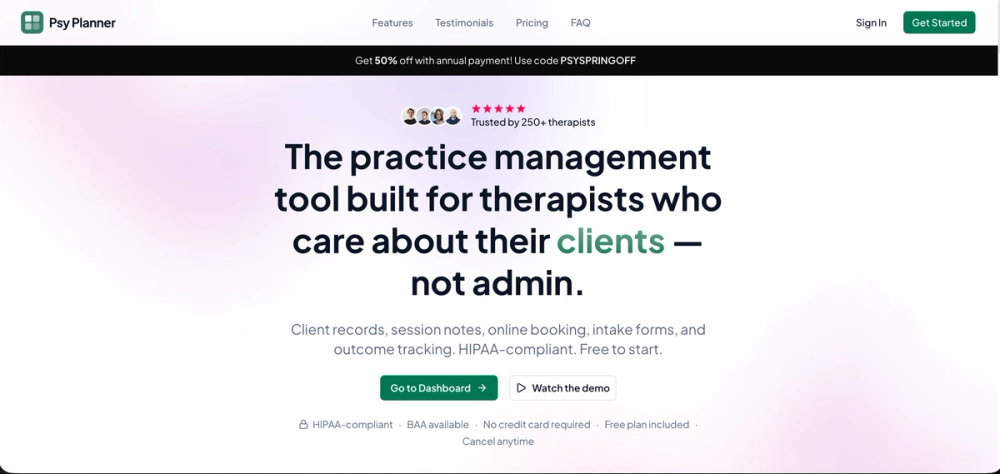
Psy Planner is practice management software for therapists and psychologists who want client records, session notes, intake forms, scheduling, and outcome tracking in one workspace. The public site positions Psy Planner as a HIPAA-compliant option with a free plan, a BAA available, and tools aimed at reducing the amount of switching between separate practice administration systems.
The clearest fit is for solo practitioners or small mental health practices evaluating a more focused practice-management workspace. The site gives useful signals around booking, records, and pricing access, while careful buyers should still verify the details that matter for their own clinical, compliance, and billing workflows.
Key Features
- Client records and session notes: Psy Planner presents client records and session notes as connected parts of the same practice workspace, which can help therapists keep core client information closer to appointment and progress details.
- Online booking: The site highlights online booking, allowing clients to book appointments directly into the Psy Planner calendar.
- Appointment scheduling: Psy Planner includes appointment scheduling for planning, rescheduling, and tracking appointments through an intuitive calendar experience.
- Intake forms: Intake forms are listed as part of the practice management toolset, suggesting support for collecting structured information before or around client onboarding.
- Outcome tracking: The homepage mentions outcome tracking, a useful signal for practices that want to follow client progress over time rather than only record appointments.
- Practice-focused workspace: The public copy describes "one workspace for your entire practice," with client records, session notes, intake forms, and scheduling connected rather than split across separate tools.
Use Cases
Psy Planner appears most relevant for therapists and psychologists who want to centralize everyday practice administration. A practitioner using separate tools for notes, scheduling, and intake may find value in a workspace that brings those activities closer together, especially if appointment management and client records are frequent sources of friction.
The online booking and calendar features make the product useful for practices that want clients to schedule appointments without extra back-and-forth. Since the site says clients can book directly and asks whether clients need to download anything, evaluators should check the client-side booking experience before relying on it for a specific practice flow.
The outcome tracking and session-note signals also suggest a fit for therapists who want more structure around ongoing client work. The site does not show every workflow detail from the fetched page, so clinicians should verify how notes, intake forms, records, and tracking behave in real use, especially if they have established documentation standards.
Pricing
Psy Planner states that users can start free and upgrade when ready. The public page also mentions no credit card required, no hidden fees, no long-term lock-in, and the ability to cancel anytime. A promotion is visible for 50% off with annual payment using the code PSYSPRINGOFF, with copy saying users save $140.00, described as six months free. Buyers should confirm whether that offer is still active, which plan it applies to, and what limits exist on the free plan before choosing a subscription.
User Experience and Support
The product page presents Psy Planner as a focused workspace rather than a broad general business platform. Its visible interface promises are practical: online booking, appointment scheduling, connected records, session notes, intake forms, and progress tracking for therapists and psychologists.
Support information is lighter on the fetched page, but the site does include prompts such as "Questions about which plan is right for you? Talk to us," "What kind of customer support do you offer?" and "Still have questions? Contact us." That suggests a contact route exists, though prospective users should verify support channels, response expectations, onboarding help, and whether support differs by plan.
Technical Details
Psy Planner describes itself as HIPAA-compliant practice management software and says a BAA is available. It also mentions HIPAA-secure storage. These are important signals for therapists handling sensitive client information, but practices should still review the vendor's security page, privacy policy, terms, and BAA process directly before entering client data.
The site also raises calendar integration in its FAQ headings, asking whether Psy Planner integrates with calendars. The fetched evidence does not provide the full answer or list specific calendar providers, so teams should confirm supported calendar systems, synchronization behavior, client booking rules, and any integration limits during evaluation.
Pros and Cons
Pros
- Focused specifically on therapists and psychologists rather than generic appointment-based businesses.
- Connects several visible practice workflows: client records, session notes, intake forms, scheduling, booking, and outcome tracking.
- Offers a free starting point with no credit card required according to the public page.
- Mentions HIPAA-compliant practice management, HIPAA-secure storage, and BAA availability, which are relevant evaluation signals for mental health practices.
Cons
- Only the primary page was available in the fetched evidence, so deeper documentation and workflow specifics are not fully visible here.
- Support details are mentioned through contact and FAQ prompts, but the public evidence does not clearly show response times or support tiers.
- Calendar integration is raised as a topic, but the visible content does not identify supported calendar providers or exact sync behavior.
- Practices with complex billing, insurance, or multi-provider requirements should verify whether Psy Planner covers those needs, because those capabilities are not clearly shown in the available page evidence.
FAQ
What is Psy Planner used for?
Psy Planner is used for practice management by therapists and psychologists. The public site highlights client records, session notes, online booking, appointment scheduling, intake forms, and outcome tracking as part of the product.
Who is Psy Planner best suited for?
Psy Planner appears best suited for therapists, psychologists, and smaller practices that want a focused workspace for administrative and client-management tasks. It may be especially relevant for practitioners who want to reduce switching between separate scheduling, notes, and intake tools.
Can clients book appointments directly in Psy Planner?
The site says clients can book their own appointments directly into the Psy Planner calendar. Before relying on this in a live practice, users should verify the exact booking controls, calendar availability rules, confirmation flow, and any client access requirements.
Does Psy Planner offer a free plan?
Yes, the public page states that Psy Planner has a free plan and says users can start free with no credit card required. It also mentions upgrading when ready, so readers should check which features are included in the free plan and which require a paid plan.
What should therapists verify before storing client data in Psy Planner?
Therapists should review the security, privacy, terms, and BAA details directly. The page mentions HIPAA-compliant practice management, HIPAA-secure storage, and BAA availability, but each practice still needs to confirm whether the vendor's policies and agreement process fit its compliance requirements.
Does Psy Planner integrate with calendars?
The site includes a FAQ heading about calendar integrations, but the fetched public evidence does not list specific calendar providers or technical behavior. Evaluators should confirm supported calendars, sync direction, conflict handling, and whether client booking updates appear automatically.
What kind of support information is visible publicly?
The page includes "Talk to us," "Contact us," and a customer support FAQ prompt. It does not clearly show support hours, channels, onboarding resources, or response times in the fetched evidence, so those details should be checked before adopting the product for a busy practice.
Conclusion
Psy Planner presents a focused practice-management option for therapists and psychologists who want scheduling, booking, client records, notes, intake forms, and outcome tracking in one place. Its strongest public signals are the practice-specific feature set, free access path, and compliance-oriented messaging.
For a practice evaluating Psy Planner, the sensible next step is to test the free plan, review the BAA and security materials, and confirm calendar, support, and workflow details against the way the practice actually operates.