
Introduction
Sendflare is an email infrastructure platform for transactional and marketing email. The public site presents Sendflare as a shared system for engineering teams that need API-triggered messages and marketing teams that need visual campaigns, audience management, and email automation.
The strongest fit is for product teams that do not want separate tools for password resets, receipts, alerts, newsletters, campaigns, and lifecycle messages. Sendflare's public positioning is practical: use the same data, reputation, and dashboard across both code-driven and human-designed email workflows.
Key Features
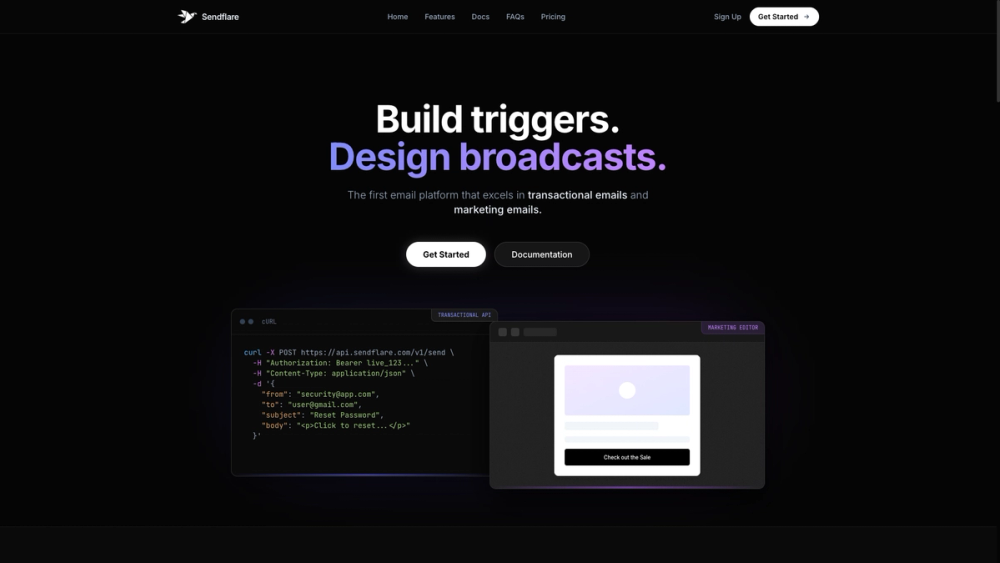
- Transactional email API: Sendflare shows an API endpoint for sending triggered messages such as password resets, receipts, verification codes, and alerts.
- Marketing email editor: The site describes visual campaigns, newsletters, updates, drips, and a drag-and-drop editor for marketing emails.
- Official libraries: Code examples are visible for Node.js, Python, Go, PHP, Java, and Rust.
- Unified data and reputation: Sendflare presents one dashboard for email metrics and shared domain reputation across transactional and marketing messages.
- Smart audience management: The platform includes contact organization with custom attributes, tags, real-time sync, and dynamic segments.
- Deliverability tooling: The site mentions SPF, DKIM, and DMARC automation, real-time blacklist monitoring, AI-driven routing algorithms, and automated IP warm-up.
Use Cases
Sendflare is useful for software products that need reliable event-based email. A development team can use the API to send messages triggered by user behavior, such as account verification, password resets, order notifications, security alerts, or subscription reminders.
Marketing teams can use the same platform for newsletters, promotional campaigns, drip sequences, and automated flows. The benefit is coordination: contacts, templates, user data, and email metrics can live in one place instead of being split between a transactional provider and a separate campaign tool.
The platform also appears relevant for teams that need segmentation around product behavior. Sendflare highlights filters by location, plan, last active status, custom attributes, and API events, which suggests it is built for SaaS teams that want audience targeting without constantly managing CSV files.
Pricing
Sendflare's FAQ states that users can start with a Free plan that includes up to 5,000 emails per month and does not require a credit card. Payment details are requested when a user upgrades to the Growth plan, and the product says it notifies users at 80% and 100% of a sending limit before they decide whether to upgrade. Full plan pricing was not clearly visible in the fetched homepage evidence, so teams should review the current pricing page before estimating monthly cost, overage handling, or dedicated IP requirements.
User Experience and Support
The public page is built around two audiences: developers and marketers. Developers get visible API examples and SDK-style snippets, while marketers get references to visual campaign creation, reusable blocks, template management, and previews across devices. This dual presentation is useful because many email tools are strong for one audience but awkward for the other.
Support signals are visible through documentation and FAQ navigation. The site includes Docs, FAQs, Pricing, Sign Up, and Get Started links, and the FAQ answers practical setup questions about credit cards, sending limits, dedicated IPs, transactional email, marketing email, drag-and-drop editing, and automation. Teams with stricter needs should still verify support response times, SLA terms, compliance documentation, and migration help before committing.
Technical Details
Sendflare exposes a transactional API at https://api.sendflare.com/v1/send in its public example and shows integration examples for Node.js, Python, Go, PHP, Java, and Rust. The examples show common email fields such as sender, recipient, subject, and HTML body, which makes the basic developer flow easy to understand.
The site also describes real-time sync, direct Postgres database integration, filtering by custom API events, single customer views, contact timelines, and CSV export. Deliverability-related claims include automated IP warm-up, real-time blacklist monitoring, and SPF/DKIM/DMARC automation. Readers should verify exact configuration steps and availability by plan before relying on those features in production.
Pros and Cons
Pros
- Combines transactional email and marketing campaigns in one product.
- Developer examples are visible across several programming languages.
- Free plan allows users to start without a credit card, according to the FAQ.
- Audience management includes custom attributes, tags, dynamic segments, and real-time sync.
- Deliverability-related features are clearly emphasized on the public page.
Cons
- Full paid plan pricing is not clear from the fetched homepage evidence.
- Dedicated IP access appears to require contacting an admin.
- Teams should verify deliverability claims against their own domain setup, list quality, and sending practices.
- Advanced compliance, SLA, and migration-support details are not fully visible in the available content.
- A unified tool may require coordination between engineering and marketing teams to avoid governance issues around templates, lists, and user data.
FAQ
What is Sendflare?
Sendflare is an email platform for both transactional and marketing email. It supports event-triggered messages through an API and human-designed campaigns through visual email tools.
Who is Sendflare best suited for?
Sendflare is best suited for SaaS teams, product companies, and technical marketing teams that need transactional messages and lifecycle campaigns in the same system. It is especially relevant when developers and marketers need to share contact data, templates, and email metrics.
What types of emails does Sendflare support?
The public FAQ says Sendflare supports transactional emails such as verification codes, password resets, and order notifications, as well as marketing emails such as promotional campaigns, newsletters, and automated marketing flows.
Does Sendflare have developer SDKs?
The public page shows examples for Node.js, Python, Go, PHP, Java, and Rust. It also includes a cURL example for the transactional send endpoint, which helps developers understand the basic API flow.
Can marketers build emails without writing code?
The FAQ says Sendflare includes a visual drag-and-drop editor for marketing emails. It also mentions reusable blocks, template management, and real-time previews across devices.
How does Sendflare pricing start?
The FAQ says the Free plan includes up to 5,000 emails per month and does not require a credit card. Users provide payment details when upgrading to the Growth plan, but readers should check the current pricing page for exact paid-plan terms.
What should teams verify before using Sendflare in production?
Teams should verify plan limits, domain authentication requirements, dedicated IP availability, compliance documentation, data retention, support response times, and whether database sync or custom event filtering is included in their chosen plan.
Conclusion
Sendflare is positioned as unified email infrastructure for teams that need both code-triggered and campaign-driven communication. Its visible strengths are transactional API support, multi-language examples, marketing email creation, audience segmentation, and deliverability-focused tooling.
For a growing SaaS or product team, the main appeal is reducing the split between engineering email and marketing email. Before adopting it, teams should confirm current pricing, deliverability setup, compliance needs, and support expectations through the official documentation and pricing pages.