
Introduction
Cursive Generators at cursivegenerators.org is a free online cursive text maker built around one input field and two export philosophies: Unicode characters you can paste into social apps, and real-font previews you can save as PNG or SVG. The site advertises 35 copy-paste styles and 36 font preview cards, with no sign-up or payment on the main generator. Before publishing a name or brand line, compare how each output type behaves-Unicode is fast but device-dependent; images stay visually fixed.
Key Features
- Main Cursive Generator with live preview across Copy & Paste and Real Fonts tabs
- Unicode styling options described on the page: script, bold script, italic, small caps, fullwidth, spaced, and wrapped decorative variants
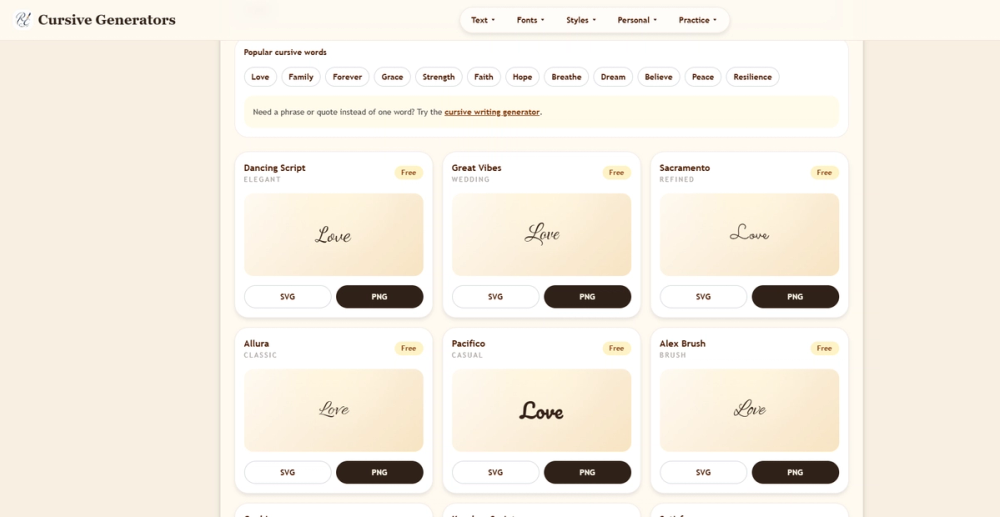
- Real-font grid covering elegant, wedding, casual, notebook, marker, bold, calligraphy, Chicano, Old English, and handwritten categories in site navigation
- One-click copy for Unicode; download SVG or export PNG from font cards in the browser
- Viral template flow: pick a proven prompt and run or tweak it in the generator
- Extended toolset linked from the header: text converter, letter and number generators, signature and tattoo pages, logo and stencil creators, typing animation, and Cyrillic letters
- Practice section with worksheets, alphabet chart, and A-Z cursive letter guides (partially published with more on a visible roadmap)
- Blog articles on cursive instruction, school policy, tattoos, and wedding invitations
Use Cases
Creators refreshing an Instagram bio, TikTok caption, or Discord display name often reach for Unicode mode because the result stays editable text. The homepage cautions that those characters are not a installed font-each app chooses how to render them, which is why a quick paste test on the target platform is worthwhile.
When the deliverable is a file-transparent signature PNG, invitation graphic, slide asset, or tattoo concept sketch-Real Fonts mode targets consistent pixels or vectors. The site contrasts use cases directly: signatures favor clean PNG transparency; tattoo references favor readable contrast for an artist; scalable brand mockups may lean SVG.
Teachers and parents can combine the generator with alphabet charts and writing-practice content linked under Practice, while designers experimenting with quote images or brand phrases can scan many styles in one grid instead of opening separate font apps.
Pricing
Public copy positions Cursive Generators as a free cursive generator: no login, credits, or payment to generate and download on the fetched homepage. Paid tiers were not listed there. If you plan client work at scale, confirm on the live site whether any font licensing or usage policy applies to exported real-font images.
User Experience and Support
The stated flow is short: type a word or phrase, choose Unicode or image output, then copy or export. Cards stack on small screens while keeping the input prominent for phone users who only need one style quickly.
Guidance is embedded in the product page (Unicode vs real font, when to use PNG vs SVG) plus a blog with handwriting tutorials and font tips. There is no separate ticket queue on the homepage; deeper answers likely live in linked guides such as signature how-tos or wedding font articles.
Technical Details
Image exports are generated client-side in the browser according to the site copy. SVG is described for scaling without blur; PNG for documents, email, Canva, and everyday sharing. Unicode output relies on standard character substitution rather than embedding a font file in social platforms.
The property is a web toolkit under the Cursive Generators brand rather than a downloadable desktop suite. No API documentation appeared on the single homepage fetch used for this profile.
Pros and Cons
Pros
- Two output models in one place reduces tool-hopping for social vs print tasks
- Large style library and satellite generators (signature, tattoo, stencil, etc.)
- Zero account barrier for first-time visitors
- On-page education about Unicode rendering limits
- Free access aligned with casual creator and classroom experimentation
Cons
- Unicode paste results can break or fallback on older devices and some readers
- Font licensing for commercial client deliverables is not spelled out on the fetched page
- Heavy pages with many nav links may feel busy compared to a single-purpose app
- Image mode is less convenient for editing copy after export
- Not a substitute for professional calligraphy or custom type design engagements
FAQ
What does Cursive Generators do?
It hosts a free web cursive generator where you type text and either copy Unicode decorative characters or download PNG/SVG images from real handwriting-style font previews at cursivegenerators.org.
When should I copy Unicode instead of downloading PNG or SVG?
Unicode works well for short social bios, captions, and chat names when you can preview on the target app. Choose PNG or SVG when you need the same look in PDFs, email signatures, print invitations, or design tools where font fallback would ruin the layout.
Do I need an account to use the cursive generator?
The homepage states no account, payment, or complicated setup is required, with free credits-on-signup language absent in favor of immediate try-it-free access.
Are there tools beyond the main generator?
Yes. Navigation lists signature and tattoo generators, name tracing, logo and note generators, stencil and typing tools, Russian Cyrillic letters, worksheets, and blog guides-each aimed at a specific text or handwriting task.
How many styles can I compare at once?
The page cites 35 copy-paste Unicode styles and 36 real cursive font previews shown together in a grid so users can scan options before exporting.
Can Unicode cursive fail on some platforms?
The site notes compatibility limits: Unicode does not install a font on Instagram, TikTok, or Discord, and some systems show missing glyphs or different fallbacks. Image export sidesteps that issue by fixing the appearance in the file.
Conclusion
Cursive Generators offers a practical split between quick Unicode cursive for social text and downloadable PNG/SVG for design-ready artwork, all behind a free, no-login entry point. Match the export type to where the text will live, use linked guides when you need handwriting context, and verify rendering on real devices before you commit a public bio or paid print job.