
Introduction
JustMarkdown is presented as an AI-assisted Markdown workspace for converting messy source material into cleaner notes, drafts, and exportable .md files. The public page highlights PDFs, Word documents, web pages, images, screenshots, spreadsheets, EPUBs, and AI chats as inputs that can be turned into structured Markdown and refined in one focused workspace.
The product appears most useful for people whose work begins with reading and collecting information, then moves into writing or knowledge capture. Developers, founders, researchers, analysts, creators, and lifelong learners are all reflected in the page copy, but readers should still verify pricing, storage, AI usage limits, and conversion quality before using it as a regular production tool.
Key Features
- Multi-format conversion to Markdown: JustMarkdown says it can convert PDFs, Word documents, web pages, images, screenshots, spreadsheets, EPUBs, and AI conversations into clean Markdown.
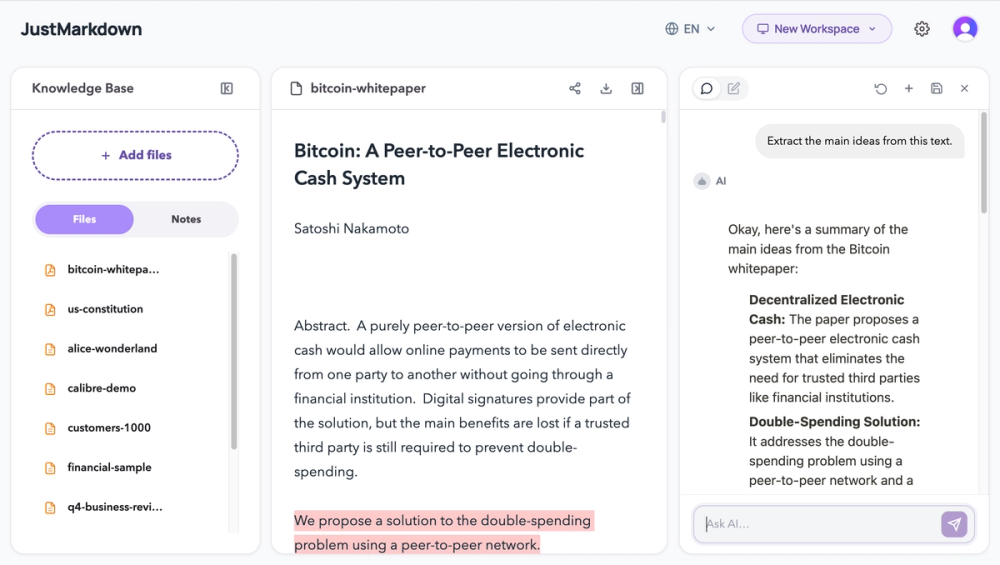
- Unified reading and writing workspace: The site describes an all-in-one setup that combines PDF and EPUB reading, AI chatbot assistance, and Markdown note-taking in a three-pane workflow.
- AI reading assistant: The public copy highlights summarizing long articles, exploring technical details, explaining difficult concepts, and appending useful AI insights directly into the workspace.
- Dual-pane annotation and note-taking: JustMarkdown describes a left-side area for editing and highlighting long-form content, with a separate right-side area for excerpts and notes.
- WYSIWYG Markdown editor: The page presents a real-time rendering Markdown editor with a distraction-reduced, paper-like writing environment.
- Markdown export: Users can download
.mdfiles and move them into a personal knowledge base after cleaning, expanding, or annotating the content.
Use Cases
JustMarkdown fits research-heavy workflows where the first challenge is turning scattered source material into something editable. A researcher working through a long paper can use the visible AI reading assistant and Markdown workspace to summarize complex methodology, capture key findings, and draft structured notes without leaving the same environment.
Developers and founders are another clear audience. The page mentions API documentation, quick product specs, technical detail parsing, and code-friendly Markdown. That makes the product relevant for turning documentation, web pages, or early product ideas into structured notes and shareable drafts.
The tool also suits learners and creators who want to study while writing. The public page describes asking AI to explain concepts, extracting definitions and formulas, and moving from messy source material toward clearer notes, reports, or published documents. The practical value is not just conversion, but the ability to keep reading, questioning, annotating, and exporting afterward.
Pricing
Pricing details are not clearly visible in the fetched page. The site includes a "Get Started" prompt, but the available evidence does not show plan names, free-trial terms, subscription pricing, usage limits, storage rules, or whether advanced AI functions require payment. Users who expect to process many files or depend on AI assistance should verify the current pricing and limits directly before adopting it.
User Experience and Support
The user experience described by the public page is more like a focused workspace than a one-off file converter. JustMarkdown emphasizes a three-pane workflow, dual-pane reading and note-taking, real-time Markdown rendering, and the ability to continue editing after conversion. That workflow is especially relevant for users who want to keep source material and draft notes close together.
Support signals are limited in the fetched evidence. The homepage includes explanatory content and FAQ-style answers about the Markdown workspace and conversion workflow, but it does not clearly show dedicated documentation, contact channels, tutorials, onboarding material, or live support. Users who need dependable support for academic, client, or team workflows should confirm the available help options.
Technical Details
The visible technical details center on supported input types and Markdown output. The page names PDFs, EPUBs, Word files, web pages, images, screenshots, spreadsheets, and AI conversations, and it emphasizes downloadable .md files. It also mentions real-time rendering and a built-in typography engine for the WYSIWYG editor.
The fetched evidence does not describe APIs, integrations, browser extensions, cloud storage behavior, model providers, team collaboration, privacy controls, or file-size limits. Those details matter for technical users because conversion tools can vary widely in how they handle complex layouts, tables, images, and sensitive source documents.
Pros and Cons
Pros
- Combines conversion, reading, AI assistance, note-taking, editing, and Markdown export in one visible workflow.
- Supports a broad set of source types named on the public page.
- Keeps Markdown as an editable working format rather than treating conversion as the final step.
- Useful for researchers, analysts, learners, developers, founders, creators, and knowledge workers.
- The dual-pane and three-pane workflow gives the product a specific use case beyond basic file conversion.
Cons
- Pricing and plan limits are not clearly shown in the fetched evidence.
- Support channels and documentation depth are not visible from the homepage content.
- Integration, storage, privacy, and collaboration details are not described.
- Users should test conversion quality with representative documents, especially complex PDFs, screenshots, or spreadsheets.
- The page does not provide enough evidence to assess enterprise readiness or long-term team workflows.
FAQ
What is JustMarkdown used for?
JustMarkdown is used to convert and refine source material into Markdown. The site presents it as a workspace for importing files and web content, extracting insights with AI, annotating material, taking notes, writing, and exporting .md files.
Who is JustMarkdown best suited for?
It appears best suited for creators, researchers, analysts, knowledge workers, developers, founders, and learners who regularly move from messy source material toward cleaner notes, reports, product specs, study materials, or publishable drafts.
How is JustMarkdown different from a simple Markdown converter?
The public page says conversion is only the first step. Users can continue reading, annotating, asking AI questions, cleaning the result, expanding notes, and exporting from the same Markdown workspace instead of stopping at a disposable download.
What file types does JustMarkdown appear to support?
The visible copy mentions PDFs, EPUBs, Word documents, web pages, URLs, images, screenshots, spreadsheets, and AI conversations. Users should verify exact file-size limits and conversion behavior with their own documents.
Does JustMarkdown show pricing publicly?
The fetched page does not clearly show pricing, plan tiers, free-trial terms, or usage quotas. Anyone evaluating the tool for frequent file conversion or AI-assisted research should confirm the current access model directly.
Can JustMarkdown help with technical documentation?
The page specifically mentions API documentation, quick product specs, technical detail parsing, architecture brainstorming, and code-friendly Markdown. That makes technical documentation a visible use case, though users should still review and edit outputs before sharing them.
What should users verify before relying on JustMarkdown?
Users should verify pricing, file limits, conversion accuracy, privacy expectations, AI usage rules, export behavior, and support availability. These details are not fully visible in the fetched homepage evidence but are important for regular or professional use.
Conclusion
JustMarkdown is best understood as an AI-assisted workspace for turning scattered source material into structured Markdown and continuing the writing process from there. Its public page gives a strong product identity around conversion, reading, AI chat, annotation, editing, and export.
For people who already think and write in Markdown, the workflow is easy to understand and potentially useful. The main open questions are practical: pricing, support, privacy, integrations, and how well the converter handles the user's real files.