
Introduction
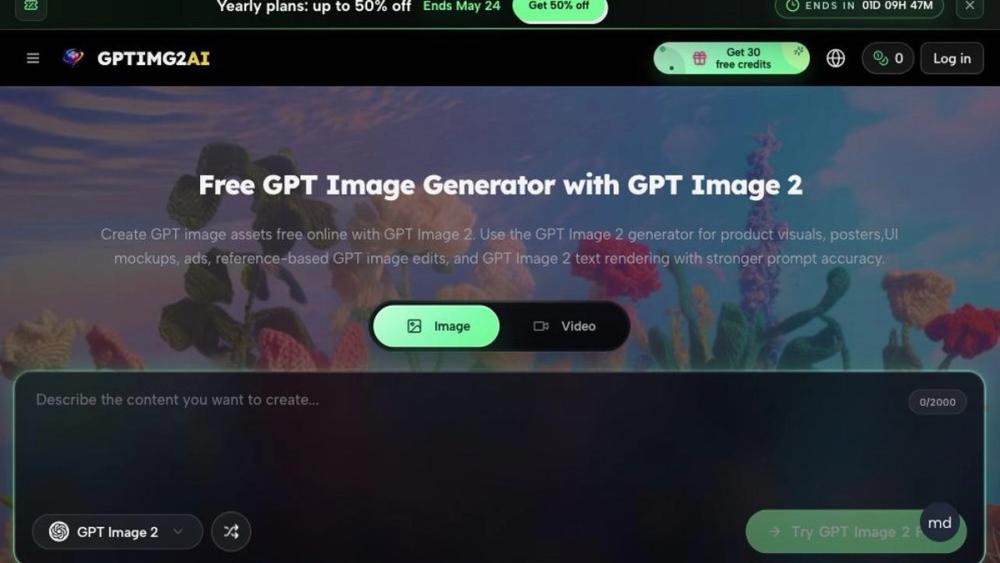
GPTIMG2 AI offers a free online GPT image generator built around GPT Image 2 for product visuals, posters, UI mockups, ads, and reference-based edits with in-image text. The public site positions the product for teams that need prompt-faithful stills before campaigns, commerce pages, or motion handoffs. New visitors see a Get 30 free credits offer and Try GPT Image 2 Free calls to action; confirm current credit rules and commercial terms on the live pricing area before production use.
Key Features
GPT Image 2 generation - Create images from text prompts (up to 2000 characters shown in the UI) with modes for image and video-oriented workflows on the homepage.
Prompt library - The site promotes a large GPT Image 2 prompt library with example briefs for snack campaigns, athletic action, typography posters, and similar styles.
Reference-based edits - Marketing copy highlights preserving face identity, product cues, layouts, and brand references through controlled revisions rather than full prompt rewrites.
On-image text - GPT Image 2 is described as stronger for readable type on posters, labels, UI mockups, and ads compared with generic generators in the site's comparison table.
Multi-model catalog - Beyond GPT Image 2, the footer and model grid reference GPT Image 1.5, Nano Banana variants, ChatGPT Image Generator, and video models such as Veo 3.1, Kling 3.0, Seedance 2.0, and Wan 2.7.
Gallery and use-case templates - Real-world examples cover product ads, character motion, stylized portrait edits, commerce thumbnails, infographics, and Swiss-style letter posters.
Use Cases
E-commerce and brand teams can draft product hero shots, packaging directions, and ad layouts before committing to a full photo shoot, using the site's snack-campaign and mockup examples as prompt patterns.
Motion and social teams may generate key stills and thumbnails first, then carry approved frames into video generators listed on the same platform.
Education and explainer creators can produce cartoon-style infographic boards and lesson visuals with readable labels, as shown in the six featured use-case blocks.
Game and entertainment art direction can explore character looks, environments, and tone frames with a consistent prompt structure across variations.
Pricing
The homepage advertises Get 30 free credits and Try GPT Image 2 Free for online GPT image generation. Navigation includes Pricing, Prompts, and Blog, with promotional copy for yearly plans up to 50% off (time-limited banners appeared in the fetched snapshot).
Exact per-credit costs, subscription tiers, and commercial licensing details were not fully extracted from a single homepage fetch; open the official pricing section before budgeting ongoing generation volume.
User Experience and Support
The interface shows image/video toggles, credit balance, language switching, and mobile navigation. Workflow copy walks users through four steps: describe the asset, generate a first pass from prompt or reference, refine layout and text, then send assets to campaigns or video tools.
Site-published testimonials quote roles such as brand designer, e-commerce lead, and motion designer; those are marketing quotes on the public page, not third-party verified reviews.
Footer links include Privacy Policy and model-specific pages such as GPT Image 2 Prompts. Deeper support channels were not prominent on the homepage alone.
Technical Details
GPTIMG2 AI is presented as a MultimediaApplication in structured page signals, focused on GPT Image 2 still generation with optional paths into video models on the same site.
The comparison table on the homepage contrasts GPT Image 2 with Nano Banana, GPT Image 1.5, and Midjourney V7 across text clarity, reference fidelity, review-ready 2K/4K output, production strength, and controlled iteration-this is vendor positioning, not independent benchmarking.
Capabilities emphasized include reference images, targeted edits (background, copy, layout), and handoff to downstream video generators. No public API or SDK was visible in the fetched evidence.
Pros and Cons
Pros
- Clear focus on production-oriented stills with readable in-image text and reference-preserving edits.
- Free credits and try-free entry lower the cost of testing prompts against real briefs.
- Broad model list for image and video in one account may reduce tool switching for hybrid teams.
- Structured use-case gallery and prompt library speed up first prompts for common ad and poster formats.
- Iteration workflow described on-site matches how review-heavy teams actually approve creative.
Cons
- Only the homepage was captured in the automated fetch; pricing and policy details may live on separate pages.
- Model comparison claims are self-published; side-by-side quality should be judged on your own briefs.
- Credit consumption rates and yearly discount terms need confirmation at purchase time.
- Commercial usage rights should be verified in terms rather than assumed from marketing FAQ headings alone.
- Dependence on multiple third-party model names may mean feature availability can change as integrations update.
FAQ
What is GPT Image 2 on GPTIMG2 AI?
The public site describes GPT Image 2 as an image generator tuned for prompt accuracy, stronger text rendering, tighter edits, and assets that survive review and reuse-aimed at production stills rather than casual experimentation only.
What can I create with GPTIMG2?
Homepage examples include product ads, cinematic action scenes, stylized portrait edits, UI thumbnails, cartoon explainers, and typography-heavy posters, plus general campaign key visuals and commerce imagery.
Is GPTIMG2 only for images?
The site lists both image generators and video generators (Veo, Kling, Seedance, Wan, and others), suggesting stills can feed motion workflows on the same platform.
Can GPTIMG2 render readable text inside images?
Marketing copy states GPT Image 2 is stronger for posters, menus, UI mockups, and ads where legible on-image copy matters; results still depend on prompt specificity and review.
Does the tool support editing from a reference image?
Yes-the site highlights reference-based GPT image edits that preserve identity, product cues, and layout while changing style or details.
Is there free access to try GPT Image 2 online?
The homepage promotes free online generation with 30 free credits and Try GPT Image 2 Free; check the current pricing page for limits after credits are used.
Who is GPTIMG2 built for?
Copy targets brand designers, e-commerce leads, creative strategists, founders, motion designers, social managers, marketers, education designers, agency producers, art directors, and game artists.
How does GPT Image 2 differ from a basic AI image generator?
The site argues GPT Image 2 holds longer briefs, improves text clarity and reference fidelity, and supports controlled iteration for review-ready 2K/4K stills compared with lighter or style-first tools in its comparison table.
Conclusion
GPTIMG2 AI centers on GPT Image 2 as a prompt-faithful image generator for ads, product visuals, posters, and reference-led edits, with free credits to start and optional expansion into other image and video models on the same site. Try the free tier on GPTIMG2 AI, validate output on your real briefs, and confirm pricing and commercial terms before scaling production use.