
Introduction
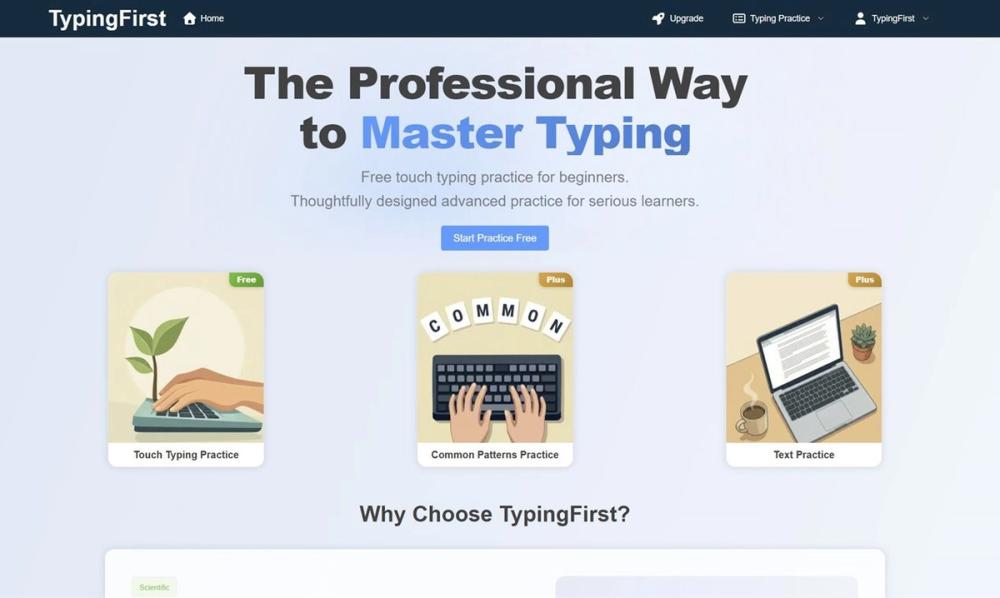
TypingFirst is an online typing practice site aimed at building touch typing speed and accuracy through structured lessons and drills. The homepage highlights free entry ("Start Practice Free"), three practice modes, and optional paid upgrades for advanced pattern work. Learners and teachers should confirm what Plus or premium unlocks on the Upgrade path before paying, since list prices were not on the primary page fetch.
Key Features
- Touch typing practice with a curriculum from home row through complex symbols
- Ngram typing practice for common character and word patterns
- Paragraph typing practice for longer-form speed work
- Expert-designed method messaging with finger-placement techniques and integrated reviews
- Structured learning path with gamified milestones
- Distraction-free, minimalist practice interface with instant browser access
- Real-time visual feedback during lessons
- Visual performance analytics: accuracy and speed analysis after lessons, weak-key identification, WPM growth over time
- Sign up / log in and navigation to Upgrade for extended content
- Related articles on timelines, adult beginners, punctuation, and stuck WPM (linked via site content signals)
Use Cases
Beginners can start with free touch typing lessons and a path toward n-grams, common words, and paragraphs-useful for students, career switchers, or anyone fixing hunt-and-peck habits. Testimonials on the page mention classroom use with technology students, where structured basics plus analytics support stronger learners.
Serious hobbyists may move to premium drills such as "Common patterns practice" after free lessons, with one quote citing progress past 80 WPM. Parents describe free courses for children before considering paid tiers. The product fits keyboarding skill building, not general productivity software beyond typing.
Pricing
The meta description and CTAs emphasize free online typing lessons and tests. User quotes reference free lessons, premium drills, and a planned Plus upgrade, plus an Upgrade nav item-suggesting freemium pricing without published dollar amounts on the homepage. Check the Upgrade page after sign-up for current Plus pricing, billing interval, and which drills require payment.
User Experience and Support
The experience is web-first: "Start Practice Free," no complex setup, and focus-oriented UI. Support signals are thin on the fetched homepage-no help center, chat, or email block was prominent. Account features (Sign Up / Log In) imply saved progress may need an account. Teachers and parents should verify classroom licensing, COPPA-related terms, and support channels on the live site before assigning students.
Technical Details
TypingFirst runs as a browser-based practice app with lesson modes and post-lesson analytics. JSON-LD and article URLs point to educational content on typingfirst.com and media.typingfirst.com. There is no public API or LMS integration list on the homepage. Advanced analytics appear tied to logged-in or paid tiers per testimonials-not fully specified in fetch.
Pros and Cons
Pros
- Clear free starting point for touch typing without upfront payment
- Multiple drill types (touch, ngram, paragraph) support staged skill building
- Analytics and weak-key feedback appeal to data-minded learners
- Minimalist UI aligns with focus during practice sessions
- Educational articles extend guidance beyond the drill UI
Cons
- Premium and Plus pricing not visible on the primary page
- Support and documentation routes were not clear in fetched evidence
- Testimonial WPM outcomes are individual stories, not guaranteed results
- Classroom or district deployment details require direct verification
FAQ
What is TypingFirst?
TypingFirst provides online typing lessons and practice modes to improve speed, accuracy, and keyboarding skills, with touch typing, ngram, and paragraph exercises.
Is TypingFirst free?
The site advertises free lessons and "Start Practice Free." Premium drills and Plus upgrades are referenced in quotes and navigation but need confirmation on the Upgrade flow.
What practice modes does TypingFirst offer?
The homepage lists Touch Typing Practice, Ngram Typing Practice, and Paragraph Typing Practice as core modes.
Who is TypingFirst for?
It targets beginners through serious learners, plus educators and parents per on-page testimonials. Advanced users may value analytics and paid pattern drills.
Does TypingFirst track progress?
Copy describes comprehensive accuracy and speed analysis after lessons, weak-key identification, and tracking WPM growth over time-likely strongest with an account.
What should I verify before upgrading to Plus or premium?
Confirm price, what "Common patterns" and other premium drills include, cancellation terms, and whether student accounts are supported for classroom use.
Can TypingFirst help if my speed is stuck?
The site publishes article topics on why WPM may plateau and how structure, accuracy, and n-gram work help-useful as reading alongside daily practice.
Conclusion
TypingFirst combines free structured touch typing practice with optional paid depth for pattern drills and Plus features. Open TypingFirst to start free, then review Upgrade details if analytics and premium exercises match your goals.