
Introduction
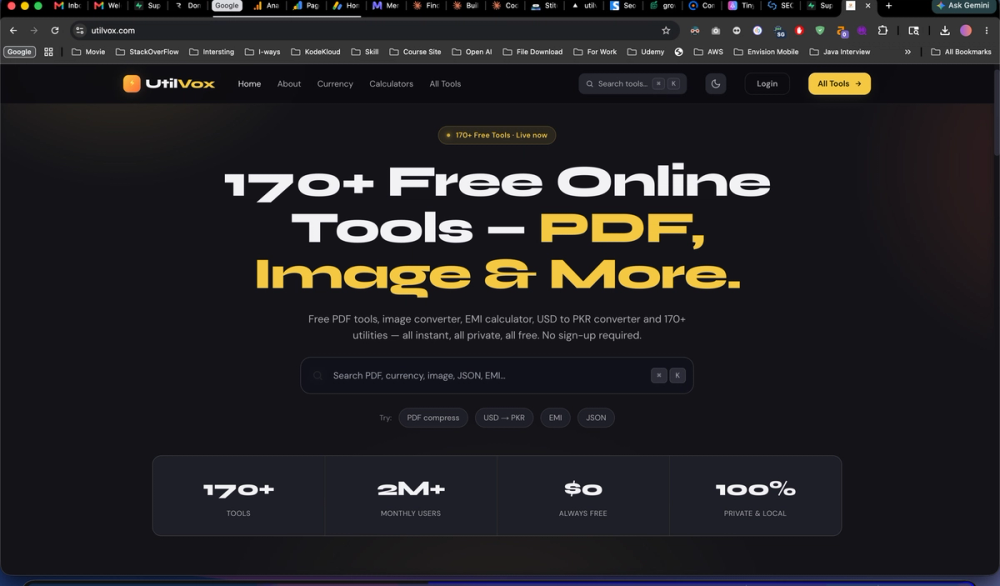
UtilVox presents itself as a collection of more than 170 free online utilities for PDF work, images, calculators, currency conversion, developer helpers, and related everyday tasks. The public site emphasizes instant in-browser use, no sign-up, and processing that runs locally where possible so files are not stored on servers. Readers who need a single bookmark for quick document, image, and conversion chores-especially with Pakistan-focused finance tools such as USD to PKR and EMI calculators-may find the breadth worth exploring, though each individual tool should be tried on a non-sensitive file first to confirm output quality meets their needs.
Key Features
- Large tool catalog: The homepage groups utilities into categories including PDF (compress, merge, split, sign, OCR, convert to Word/Excel/image), image (HEIC to JPG, crop, bulk resize, background removal), calculators, currency and crypto conversion, developer tools (JSON, JWT, regex, hashing), text and SEO helpers, and date/time utilities.
- Browser-local processing: Copy on the site states that everything runs locally where possible, with no upload and no wait, and that PDF and image workflows can stay in the browser without watermarks on PDF tools.
- Privacy positioning: Messaging highlights no accounts, no tracking, and no files saved on servers, plus a "Read-Process-Discard" policy described on the about page.
- Always-free access: Visible metrics on the about page list subscription cost as $0, with no paywalls or "upgrade for HD" quotas called out on the main site.
- Search and discovery: A search bar with keyboard shortcut hints and category browsing (PDF, image, developer, SEO, and others) helps jump to specific tools.
- Featured utilities: Trending and featured items include word counter, plagiarism checker, HTTP status checker, and a live currency converter with mid-market rates for 160+ currencies updated hourly.
Use Cases
Freelancers and students who routinely compress PDFs, convert HEIC photos from iPhones, or check word counts for assignments and gig descriptions can use UtilVox as a tab-based toolkit instead of installing separate apps. The site explicitly mentions IELTS-style word limits, Fiverr gig text, and essay plagiarism checks, which suggests a practical writing-and-submission workflow rather than enterprise document management.
Developers may reach for the listed JSON formatter, JWT decoder, regex tester, UUID generator, and minifiers during day-to-day debugging. Content and SEO roles can use keyword density, meta tag, and sitemap-related utilities when the public copy for those tools matches their checklist needs.
Users in Pakistan or working with PKR may lean on USD to PKR (and related pairs), EMI calculators with Islamic finance options mentioned on the site, and invoice-style utilities described in the marketing copy. Anyone evaluating the suite should confirm that a specific tool's output format (for example PDF to Word fidelity or e-signature claims) meets legal or professional requirements before relying on it for client deliverables.
Pricing
The site consistently describes UtilVox as free: homepage counters show $0 subscription cost and "always free," and the about page repeats $0 subscription with universal access and no tiered gating. There is no visible paid plan table, trial countdown, or per-seat pricing on the fetched pages. If your organization needs invoicing, SLAs, or volume limits, those are not documented on the public site and would need direct confirmation with the operator.
User Experience and Support
Navigation is tool-centric: home, about, currency, calculators, and an "all tools" index with category filters. Individual tools open from cards with short descriptions (for example PDF compressor "up to 90%" size reduction or "100% private" PDF reader). The footer lists a Lahore, Punjab address and phone number (+92 305 5101804), plus links to all tools, currency converter, EMI calculator, developer tools, legal privacy, and about-useful for basic contact but not a full help center or ticket system. There is no dedicated documentation portal or live chat called out on the fetched pages; support appears limited to on-page tool UX and the published contact details.
Technical Details
UtilVox describes client-side execution using WASM and modern browser APIs, with tools optimized for browser-native processing and a stated 100MB single-file limit on the about page. SSL/TLS is mentioned in marketing language on that page. Categories span offline-first calculators, hourly-updated currency rates, historical charts back to 1999 for fiat, and real-time crypto conversion for 200+ tokens per site copy. Not every tool's exact stack is listed tool-by-tool; heavy PDF or OCR jobs may still depend on browser memory and device performance, which the site does not benchmark independently.
Pros and Cons
Pros
- Very wide catalog in one domain, reducing the need to hunt across multiple single-purpose sites.
- Clear free, no-sign-up positioning across homepage and about content.
- Strong privacy narrative aligned with local processing for many PDF and image utilities.
- Useful regional and freelance-oriented calculators and currency tools visible in copy.
- Developer and SEO utilities alongside document tools suit mixed professional workflows.
Cons
- Quality and accuracy of conversions (PDF to Word, OCR, legal e-sign claims) must be verified per use case; the site does not publish third-party validation.
- Support is thin on the public pages-no obvious knowledge base or status page beyond marketing metrics.
- Catalog size can make it harder to know which tools are newest or best maintained without trying each one.
- Some about-page statistics (latency, operation volume) are self-reported marketing figures, not independently audited.
- Tools that need live rates or network calls may behave differently offline than purely local utilities.
FAQ
What is UtilVox in plain terms?
UtilVox is a free online toolbox hosting 170+ browser-based utilities for PDFs, images, text, SEO checks, developers, calculators, and currency/crypto conversion, aimed at users in Pakistan and worldwide according to its meta description.
Who is UtilVox most useful for?
It appears aimed at individuals who want quick, no-account utilities-students and writers checking word counts or plagiarism, freelancers converting currencies or generating QR codes, and developers formatting JSON or testing regex-rather than teams needing centralized admin or audited compliance tooling.
Do UtilVox PDF tools upload my files to a server?
The site states that many PDF utilities run entirely in the browser and that processing happens locally with files not uploaded to a server; users handling confidential documents should still test with non-sensitive files and read the privacy page for the full policy wording.
How does UtilVox handle pricing and accounts?
Public pages show $0 cost, no paywalls, and no sign-up required for the suite; there is no visible premium tier on the fetched URLs.
Can I use UtilVox EMI and USD to PKR tools for loan or tax decisions?
The site describes EMI calculators with Pakistan-oriented options (including Islamic finance labels) and live currency pairs; those outputs are informational calculators only-verify rates, fees, and terms with your bank or advisor before financial commitments.
Are UtilVox developer and SEO tools suitable for production pipelines?
They are presented as fast, zero-tracking utilities for ad hoc tasks (JWT decode, sitemap generation, keyword density). They are not described as CI-integrated APIs; confirm whether outputs meet your release or compliance checklist before automating around them.
Conclusion
UtilVox aggregates a large set of free, browser-oriented utilities with a consistent message around local processing, privacy, and zero subscription cost. It is a reasonable starting point for everyday PDF, image, calculator, and developer chores if you validate each tool on your own files and requirements. Visit UtilVox to search the catalog and open the specific utility you need.