
Introduction
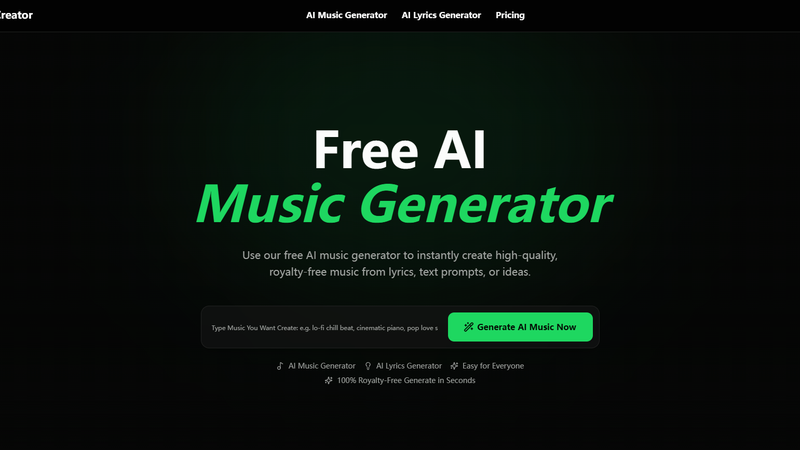
Free Music Creator AI is a browser-based tool that generates royalty-free music from text prompts, lyrics, or style descriptions. Users describe what they want - a mood, genre, or lyrical theme - and the AI produces a complete song with melody, rhythm, and instrumentation. The platform also offers an AI lyrics generator, voice remover, and stem splitter, positioning itself as a lightweight music production toolkit for content creators who need original audio without hiring a composer or learning a DAW. For YouTubers, podcasters, TikTok creators, and indie game studios who need background music or full tracks on a budget, the pitch is straightforward: describe the music, get the file.
Key Features
- Text-to-Music Generation - Type a prompt describing the mood, genre, or concept, and the AI generates a full song with melody, rhythm, harmony, and style. No music theory knowledge is required.
- Lyrics-to-Song Conversion - Upload or write lyrics, and the AI turns them into a complete song with vocals and instrumentation matched to the lyrical content.
- AI Lyrics Generator - Generate editable lyrics from a title, prompt, mood, style, structure, and language. The lyrics can be used as a starting point for songs or refined manually.
- AI Voice Remover - Separate vocals from instrumentals in any uploaded song. Useful for creating karaoke versions, extracting vocal tracks, or generating remix stems.
- AI Stem Splitter - Isolate individual components (vocals, drums, bass, piano, other instruments) from any song for remixing, sampling, or practice.
- MIDI and Audio Export - Download generated tracks as audio files or export MIDI data for further editing in a DAW.
- 50+ Music Styles - The platform supports a range of genres and moods, from vocal pop and Afrobeat to drift phonk and indie acoustic.
Use Cases
For YouTubers and video creators who need background music for videos, the text-to-music tool eliminates the licensing headaches of using copyrighted tracks. Describe the mood - "upbeat corporate" or "dark cinematic" - and get a royalty-free track in seconds. The commercial use license on paid plans makes this practical for monetized channels.
For podcasters who need intro music, transition stingers, or background beds, the quick generation workflow means producing custom audio without waiting for a freelancer or learning music production software.
For indie game developers who need placeholder or final audio assets, the stem splitter and voice remover provide practical tools for manipulating existing tracks, while the text-to-music generator can produce original background music matched to game atmospheres.
For TikTok and social media creators who need short, catchy tracks, the ability to generate music from a mood description and download it directly makes the workflow faster than sourcing from a music library.
Pricing
The site offers a free tier with 2 songs per month, 1 music generation per month, and 1 concurrent task. Free tier downloads are for personal use only. Paid plans unlock more generations, downloads, and commercial use licenses. Monthly and yearly billing options are available, with a 30% discount on yearly plans. Exact paid tier pricing is not fully visible on the fetched homepage - readers should check the pricing page for current rates.
User Experience and Support
The interface follows a three-step flow: describe your idea, let AI generate the music, then preview and download. The site reports 122,104 songs created across 6,000+ active creators, suggesting the tool has been tested at scale. Support details beyond the site navigation are not prominently featured in the fetched evidence. A login system exists for tracking credits and generation history.
Technical Details
Free Music Creator AI uses AI models to generate music from text inputs, handling melody, rhythm, harmony, and instrumentation in a single generation pass. The voice remover and stem splitter use AI-based audio separation to isolate vocals and instruments. The platform is browser-based with no software installation required. Specific model architectures or underlying frameworks are not disclosed on the public pages.
Pros and Cons
Pros
- Free tier allows testing with 2 songs per month without payment
- Text-to-music generation requires no music theory or production experience
- Royalty-free output with commercial use licensing on paid plans
- Additional tools (lyrics generator, voice remover, stem splitter) add practical value
- 50+ style options cover a reasonable range of genres and moods
- Browser-based - no software installation required
Cons
- Free tier is limited to personal use only, with 2 songs per month
- Paid plan pricing details are not transparently displayed on the homepage
- AI-generated music quality may not match professional studio production
- No visible API or integration with DAWs beyond MIDI export
- The accuracy of style matching from text prompts is not documented with examples or benchmarks
FAQ
What is Free Music Creator AI?
Free Music Creator AI is a browser-based tool that generates royalty-free music from text prompts, lyrics, or style descriptions. It also includes an AI lyrics generator, voice remover, and stem splitter for additional music production tasks.
Is it really free?
The free tier allows 2 songs per month with personal use only. Paid plans unlock more generations, downloads, and commercial use licensing. Check the pricing page for current rates.
Can I use the music commercially?
Paid plans include a commercial use license. The free tier is for personal use only. Verify the specific license terms on the site before using generated music in monetized content.
How does text-to-music generation work?
Type a description of the music you want - including mood, genre, style, or lyrical theme - and the AI generates a complete song with melody, rhythm, and instrumentation. No music production experience is needed.
What additional tools are included?
Beyond music generation, the platform offers an AI lyrics generator, AI voice remover (for separating vocals from instrumentals), and an AI stem splitter (for isolating individual instruments from songs).
Can I export the music for editing in a DAW?
Yes. Generated tracks can be downloaded as audio files or exported as MIDI data for further editing in music production software.
Conclusion
Free Music Creator AI addresses a real need for content creators who need original music without the cost or complexity of traditional production. The free tier makes evaluation low-risk, and the text-to-music workflow is genuinely accessible to non-musicians. The additional tools - lyrics generator, voice remover, and stem splitter - extend the platform beyond simple generation into practical music manipulation. For YouTubers, podcasters, and social media creators who need royalty-free background music on a regular basis, the tool is worth testing on the free tier before committing to a paid plan. Readers should verify the paid plan pricing and commercial license terms on the Free Music Creator AI pricing page before using generated music in monetized projects.