
Introduction
JavaScript Tools on JSTools.Space is a free hub of browser-based developer utilities for formatting JSON and markup, encoding and decoding Base64, hashing text, inspecting JWTs, and generating placeholder data. The site brands the collection as privacy-first: work runs in the browser with input intended to stay on your device. Engineers who want quick tasks without CLI installs or accounts may find it handy-still verify each tool page if your organization restricts online handling of secrets.
Key Features
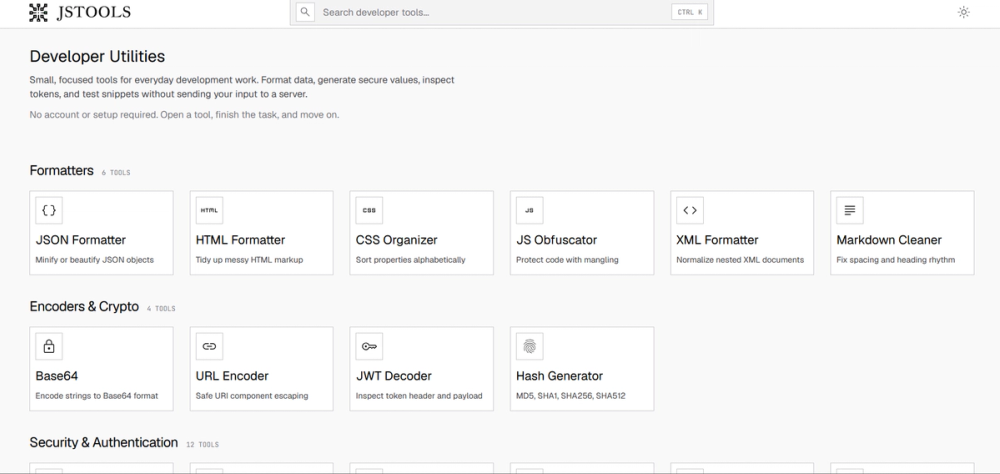
- Formatters: JSON beautify/minify, HTML tidy, CSS organizer and minifier, JS obfuscator, XML formatter, Markdown cleaner, Markdown-to-Word export
- Encoders & crypto: URL encoder, JWT decoder, hash generator (MD5 through SHA512), Base64 conversions for text, images, PDF, video, audio, files, and hex
- Security & authentication: Local generation of passwords, tokens, and identifiers
- Generators: QR codes and dummy data for dev and design
- Developer utilities: Text comparison, structured data queries, snippet prototyping workspaces
- CTRL+K command palette to search tools by name or operation
- No account required on the public pages reviewed
Use Cases
API debugging often needs a JSON formatter or JWT decoder while reading responses locally. The docs emphasize browser-side processing for sensitive test payloads you prefer not to upload elsewhere.
Front-end cleanup tasks-minifying CSS, obfuscating a snippet, or normalizing XML-fit the formatter and encoder categories. Technical writers may use Markdown-to-Word for handoffs. Teams should confirm obfuscation and hashing tools meet their security policy; the site treats them as conveniences, not audited compliance products.
Pricing
Homepage copy describes free privacy-first utilities. No paid tiers appeared on fetched pages. Revisit the live site if monetization or usage limits change.
User Experience and Support
Open a tool, paste or configure input, validate output, then copy or download. Documentation groups tools into Formatters, Encoders & Crypto, Security & Authentication, Generators, and Developer Utilities with per-tool guidance.
Support appears documentation-led; no ticket portal was visible on fetched pages. The docs caution not to treat generated secrets as production credentials after public sharing.
Technical Details
Utilities run client-side unless a specific page states otherwise. Covered formats include JSON, HTML, CSS, XML, and Markdown plus auth-related decoders. No public API or npm package was mentioned-integration is via the web UI.
Pros and Cons
Pros
- Wide everyday-dev catalog behind one domain and keyboard search
- No signup for free tools described on the site
- Clear docs workflow and privacy-oriented positioning
- Useful for quick local formatting and encoding tasks
Cons
- Beyond "free," detailed commercial terms are thin on fetched pages
- No visible enterprise support line
- Browser UI may not replace CI automation
- Security-sensitive teams must validate tool-by-tool acceptability
FAQ
What is JSTools.Space (JavaScript Tools)?
A free online developer tools hub at jstools.space with formatters, encoders, generators, and utilities that typically run in your browser without sending input to a server, per site copy.
Who should use JSTools.Space?
Developers, QA, and technical writers doing ad hoc formatting, decoding, or generation during daily work-not teams that require hosted APIs with formal SLAs unless they confirm fit.
Does JSTools.Space store my pasted data?
Documentation says utilities run in the browser and input is intended to stay on your device; check individual tool pages and internal policy before pasting production secrets.
Is JSTools.Space free?
Public descriptions emphasize free access with no account on the hub; confirm the live site for any future paid features.
Where are instructions for each tool?
The docs site explains categories, general workflow, and what each tool type is for-start from the docs home and pick the matching category.
Are hash and obfuscation tools enough for production security?
They are presented as developer shortcuts; production decisions should use approved libraries and key management for your threat model.
Conclusion
JSTools.Space collects common formatting, encoding, and generation tasks into a free browser toolkit with structured docs. It suits quick manual workflows; confirm privacy and policy fit before handling regulated data.