
Introduction
Wax & Pigment is a precision formulation app for artists, painters, and small-batch paint makers who work with handmade oil sticks and pigment-based recipes. Built independently by a painter in Oslo, it sits within the Nice Software suite of studio-focused tools and addresses a gap that most general-purpose paint calculators ignore: repeatable batch formulas grounded in real pigment data.
For anyone who has ever eyeballed oil-to-wax ratios and ended up with a batch that was too soft, too brittle, or impossible to recreate, the value proposition is direct. You select a pigment, define a target firmness, and let the app handle the math for oil, wax, and pigment quantities. The result is a recipe you can actually scale without starting over by hand.
Key Features
Real Pigment Reference
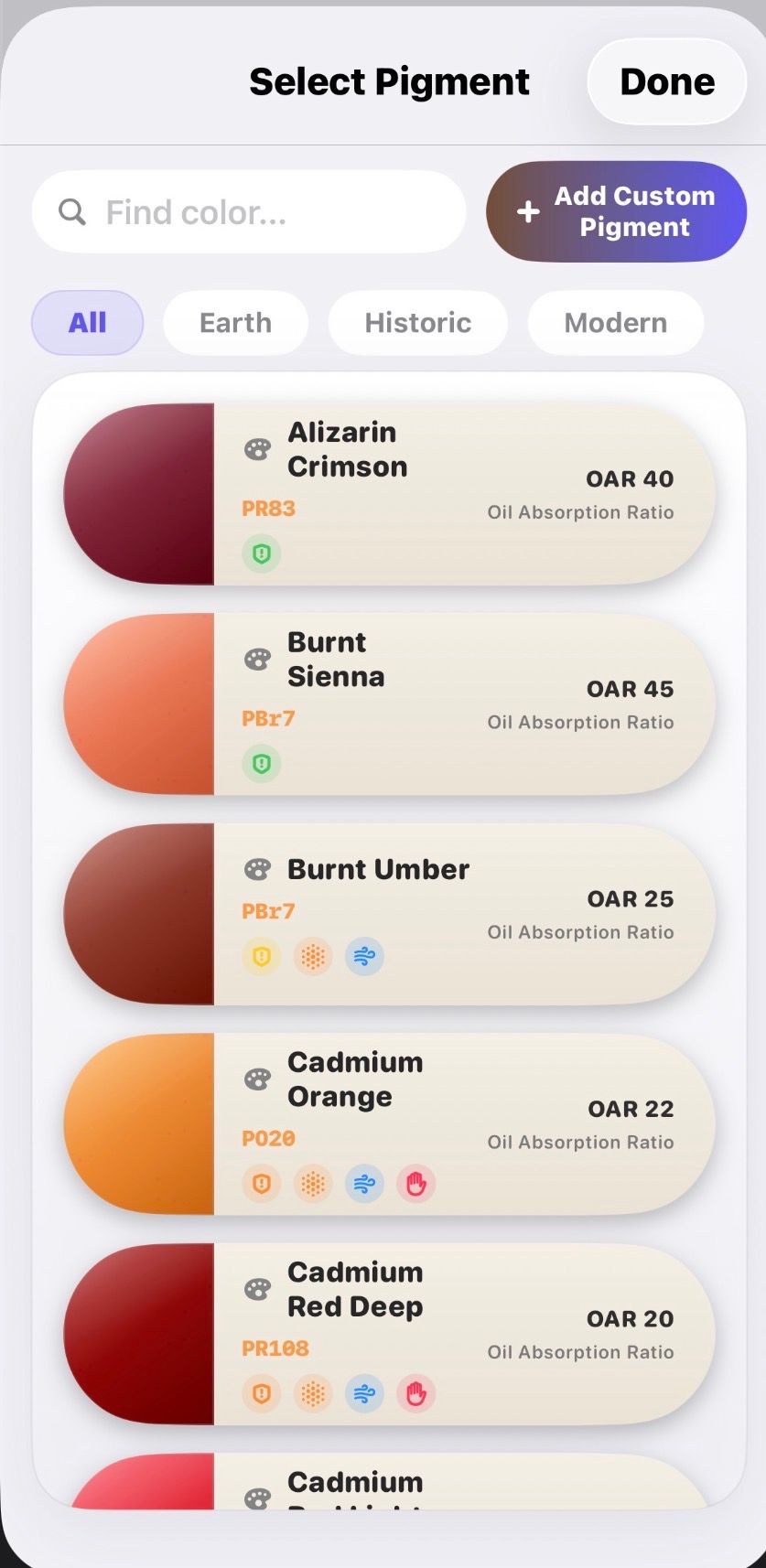
The app stores color index names, oil absorption rates, opacity, lightfastness, toxicity classifications, drying notes, and handling reminders alongside each recipe. Instead of relying on memory or scattered notes, every formulation decision starts from material data rather than guesswork.
Repeatable Batch Math
Oil, wax, pigment, firmness, and batch size recalculate together. A recipe that produced one good stick can be scaled to three or thirty without recalculating ratios manually. This is the core utility for painters who want consistency across studio sessions.
Mix Overview
Scale a single recipe into multiple sticks, combine pigments into custom blends, swap oils, waxes, solvents, and additives, and keep a cleaner view of what each batch contains. The interface is designed for iteration without losing track of proportions that worked.
Texture and Safety Forecast
Firmness targets, handling notes, and safety warnings flag toxic pigments, high-solvent mixes, and texture problems before they become wasted material on the bench. The public page notes these are guidance rather than a replacement for studio judgment and supplier documentation.
Guest Mode and Premium Sync
Guest mode keeps everything local on-device with no signup required. Premium users who sign in can sync through iCloud, restore purchases, and manage account state. The site emphasizes that saved formulas, project notes, and exports remain yours regardless of subscription status.
PDF Export
The studio shelf listing mentions PDF export capability, suggesting formulations can be taken out of the app for reference during a session or shared with collaborators.
Use Cases
Handmade Oil Stick Production
The primary use case. Painters who manufacture their own oil sticks from raw pigments, oils, and wax can build a library of repeatable recipes instead of relying on notes scribbled during a session. The batch-scaling math is particularly valuable here.
Studio Material Management
Keeping pigment data, handling notes, and formulation records in a single app reduces the friction of tracking what you used, how it performed, and what to change next time. For studios working through multiple pigment experiments, this creates a searchable reference.
Small-Batch Paint Making
Artists who mix custom paint colors in small quantities benefit from the batch-scaling math. A recipe that worked for three sticks can be scaled to thirty without recalculating by hand, which matters when you are working with expensive pigments.
Safety-Conscious Studios
The toxicity and handling reminders add practical value for studios working with cadmium, lead-based, or other hazardous pigments. Having safety data visible during formulation, rather than buried in a reference book, supports more cautious material choices.
Collaboration and Documentation
PDF export and shareable formulas make it easier to hand off a working recipe to an assistant, a collaborator, or simply to your future self when revisiting a formulation months later.
Pricing
Wax & Pigment uses a freemium model with four tiers:
- Free Tier ($0) - Core formulation tools, available without a card or account. Designed to let you test the workflow before committing.
- Monthly Studio ($2.99/month) - Low-cost access for active studio periods or short projects.
- Yearly Studio ($19.99/year) - Best annual value for painters who use the app regularly throughout the year.
- One-Time Buy ($49.99 once) - Permanent access with no renewals, aimed at artists who prefer a single purchase over recurring billing.
The one-time purchase option stands out in a market where most studio tools default to subscriptions. It suggests the developer understands the preference many independent artists have for owning their tools outright.
User Experience and Support
The public page presents a clean layout with four real app screenshots labeled by function rather than marketing language. There are no mock batches or invented workflows shown; the images depict actual screens from the app.
Support is available via email at hello@nicesoftware.xyz, and the site states that an actual human will reply within a day or two if you include your app name, platform, and a short issue description. This is a small, independently run operation rather than a large support team, which is worth setting expectations around.
The broader Nice Software shelf includes companion tools like Painting Mirror, NotaTime Studio, and NotaBill Studio, which may appeal to artists looking for a cohesive set of lightweight studio utilities.
Technical Details
Wax & Pigment is available as an iOS app with a web preview option. The site does not disclose specific frameworks or programming languages, which is not unusual for a product page but means developers evaluating data portability will need to reach out directly.
Premium sync relies on iCloud or cloud features, and the app includes local data clearing and account deletion flows for App Store compliance. Guest mode operates entirely on-device, so users concerned about data residency have a clear local-only path.
PDF export is mentioned on the studio shelf listing, though the product page itself does not elaborate on export format details or batch export capabilities.
Pros and Cons
Pros:
- Fills a specific niche that general paint calculators do not address
- Pigment data stored alongside recipes for grounded formulation decisions
- Batch-scaling math handles oil, wax, and pigment ratios together
- Free tier available without account or card
- One-time purchase option at $49.99 for permanent access
- Guest mode keeps data local by default
- Built by an active painter, not a detached software team
Cons:
- iOS only; no mention of Android, desktop, or full web-app versions
- Technical details and export capabilities are not fully documented on the public page
- Safety warnings are explicitly labeled as guidance, not a replacement for professional judgment
- Small independent developer means support response times may vary
- No visible integration with other studio tools or external databases
FAQ
What types of recipes can Wax and Pigment handle?
The app focuses on oil stick formulation and pigment-based paint recipes. The evidence shows it calculates oil, wax, and pigment ratios with firmness targets, and supports blending multiple pigments into custom mixes. It does not appear to cover water-based media or acrylic formulations based on the public page content.
Is the free tier truly functional or just a limited demo?
The public page states the free tier includes core formulation tools and requires no card. The paid tiers add sync and long-term continuity features. The site explicitly invites you to try the workflow before paying, which suggests the free version is a genuine working tool rather than a stripped preview.
Can I use Wax and Pigment without creating an account?
Yes. Guest mode keeps the app local-only with no signup required. You only need an account if you want premium sync, purchase restoration, or cloud-based features.
How does the lifetime purchase work compared to the subscription?
The one-time buy at $49.99 grants permanent access without renewals. Premium features like sync and restore are included, and the page notes that deletion and local clearing controls remain available even as features may evolve.
What happens to my data if I stop paying or cancel?
The public page states that saved formulas, project notes, and exports remain yours. Local data clearing and account deletion flows are included. If you used guest mode, data stays on-device. Premium users who sign in can sync through iCloud, but the emphasis is on local ownership of records.
Does the app warn me about toxic pigments?
Yes. Texture and safety forecasts include handling notes and safety warnings for hazardous pigments. The site is transparent that these are guidance, not a substitute for your own studio judgment and supplier documentation.
Conclusion
Wax & Pigment does one thing well: it takes the guesswork out of oil stick formulation by grounding recipes in real pigment data and batch math. For painters who make their own materials, the combination of free-tier access, transparent pricing with a lifetime option, and guest-mode privacy makes it easy to evaluate without commitment. The app is built by a working artist rather than a large software team, which shows in the practical approach to both the product and its presentation. If repeatable pigment recipes and safe studio practice matter to your workflow, Wax & Pigment is worth trying at no cost to see whether it fits.