
Introduction
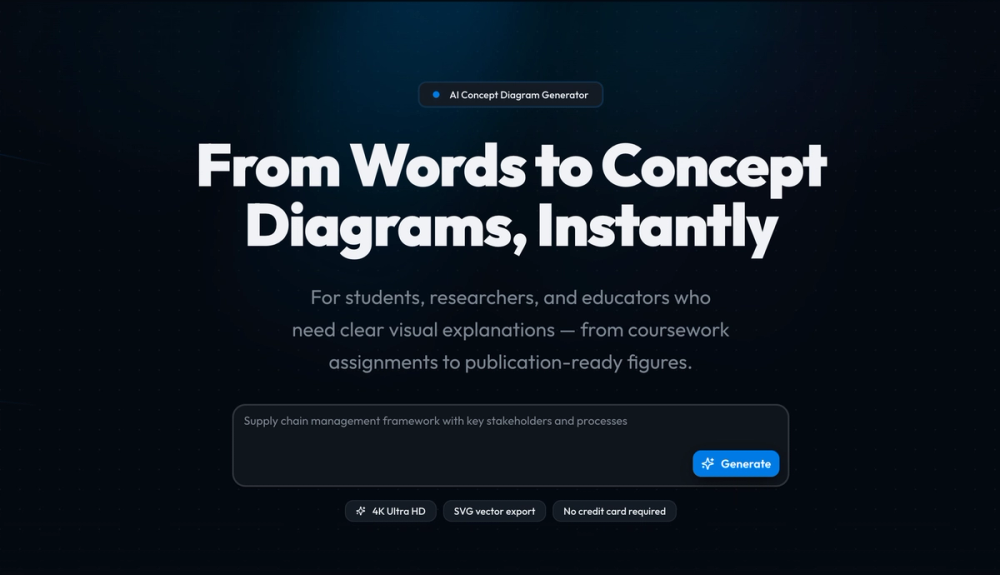
Vizcept is an AI-powered concept diagram generator aimed at students, researchers, and educators. The public site promises to turn plain-language descriptions into structured diagrams with publication-oriented export options, including 4K Ultra HD PNG and editable SVG. Anyone evaluating it for thesis figures or journal graphics should confirm credit limits, pricing tiers, and whether outputs meet their field's style guidelines on a trial run.
Key Features
- AI concept diagram generator - Describe topics, variables, and relationships in plain English; Vizcept analyzes the text and produces a structured diagram in seconds.
- Specialized diagram tools - The catalog includes AI Diagram Maker, free-body diagrams, animal cell diagrams, syntax trees, food webs, conceptual frameworks, circuit diagrams, phylogenetic trees, graphical abstracts, bell curves, sentence diagrams, fishbone diagrams, and a scientific color palette tool.
- Style and output controls - Users can pick diagram style, aspect ratio, and resolution before generation.
- Export formats - Download high-resolution PNG for slides or SVG for editing in Figma, Illustrator, or Inkscape, then paste into papers, posters, or presentations.
- Free credits entry - The homepage advertises 30 credits free with no credit card required to start.
- Platform and localization - Header links include Platform, Pricing, Blog, mode toggle, and language switch.
Use Cases
Undergraduate through PhD students may use Vizcept for assignments, lab reports, and thesis presentations where topic maps, process flows, or relationship diagrams clarify arguments. The student-oriented copy mentions free credits and no card for getting started.
Researchers appear to be a second audience: the site references conceptual frameworks, pathway diagrams, research models, thesis-ready visuals, and graphical abstracts-outputs that often need both clarity and editability via SVG.
Educators who teach with visual explanations could use the same flow for lecture slides or handouts, especially when specialized science diagrams (cells, circuits, food webs) are faster to draft from text than to draw from scratch. Journal acceptance still depends on your publisher's figure rules; "publication-ready" on the site is positioning you should validate against your target venue.
Pricing
The homepage promotes Get 30 Credits Free and no credit card required for initial use. Copy also references a free plan with credits to try before upgrading, with a dedicated Pricing page linked in navigation. Specific paid tier names, per-credit costs, and team plans were not detailed on the homepage snippet-open the Pricing page on vizcept.com for current numbers before heavy use.
User Experience and Support
The workflow is presented in three steps: describe what you need, let AI generate the diagram, then export and use anywhere. Navigation groups many tools under Create and All Tools, which may help users land on the right generator quickly.
Support signals on the fetched homepage are thin: Blog and Platform appear, but no help center, live chat, or support email is prominent in the reviewed content. Users with billing or export issues should look for contact or docs links on the live site and Pricing page.
Technical Details
Outputs include 4K Ultra HD PNG and SVG vector export for downstream editing. The site names Figma, Illustrator, and Inkscape as compatible targets for SVG. JSON-LD on the page classifies the offering as an educational application.
There is no public API or LMS integration described on the homepage. Generation appears browser-based around natural-language input plus tool-specific generators. Institutions evaluating accessibility or data handling should ask the vendor directly-those details are not spelled out in the marketing copy reviewed here.
Pros and Cons
Pros
- Wide tool list from general concept maps to domain-specific science and linguistics diagrams.
- SVG export supports real post-processing in common design apps.
- Low-friction trial via free credits without card requirement, per homepage messaging.
- Clear three-step story from description to export.
Cons
- Support and documentation paths are not obvious from the homepage alone.
- University logos and "trusted by" strips are marketing social proof-not independent verification of adoption.
- Publication suitability varies by discipline; AI layout may still need human revision.
- Credit-based pricing means heavy users must confirm ongoing cost on the Pricing page.
FAQ
What is Vizcept?
Vizcept is an AI-powered generator that creates concept and specialty diagrams from text descriptions, with export options aimed at slides, posters, and academic figures.
Who is Vizcept for?
The site targets students, researchers, and educators who need visual explanations from coursework through journal-oriented figures, including conceptual frameworks and specialized diagrams.
What diagram types can you generate?
The public catalog lists tools such as conceptual frameworks, free-body and circuit diagrams, animal cells, syntax trees, food webs, phylogenetic trees, graphical abstracts, bell curves, fishbone diagrams, and more, plus a general AI diagram maker.
What export formats does Vizcept offer?
You can download high-res PNG and editable SVG; the site suggests using SVG in Figma, Illustrator, or Inkscape before placing graphics in papers or presentations.
How do free credits work?
The homepage offers 30 credits free with no credit card required, and mentions a free plan with credits before upgrading. Confirm current credit rules and what one generation costs on the Pricing page.
Can Vizcept diagrams go into academic papers?
The product is marketed for publication-ready output and research visuals, but you should verify resolution, font, labeling, and citation policies with your target journal or institution-automated diagrams may need editing.
Does Vizcept integrate with LMS or reference managers?
No such integrations are described on the homepage reviewed here; expect a standalone web tool unless the Platform page documents more.
Conclusion
Vizcept focuses on AI-generated concept and specialty diagrams for academic and teaching workflows, with PNG and SVG export and a broad tool menu. Try the free credits on vizcept.com, then review Pricing and output quality against your real assignments or manuscripts before relying on it for high-stakes figures.