
Introduction
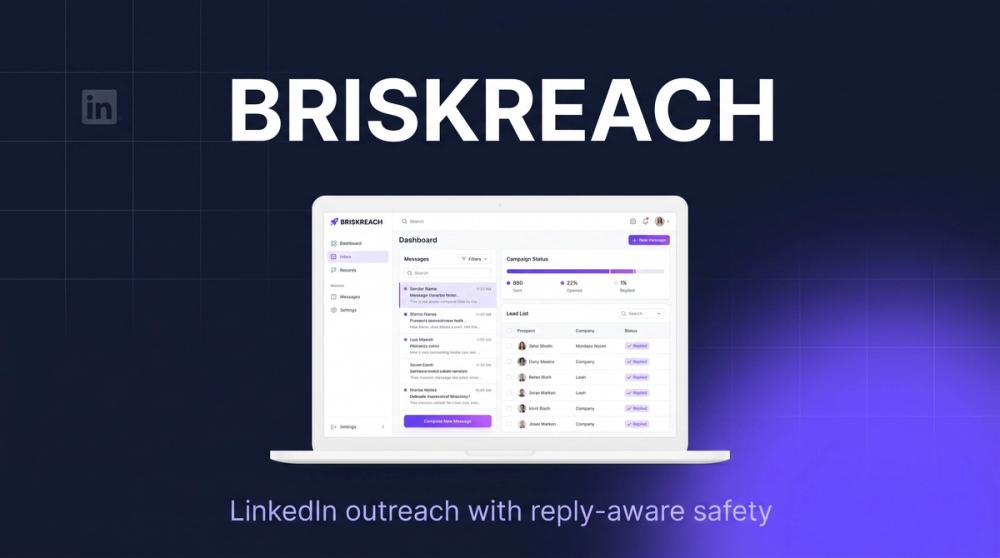
BriskReach is a LinkedIn outreach and CRM platform built around controlled sending, reply-aware pauses, lead management, and optional managed human reps. The public site presents it for teams that want to run LinkedIn campaigns from their own accounts, keep replies in one inbox, and understand campaign limits before messages go out.
The clearest fit is for founders, sales teams, agencies, and outbound operators who want more structure than a spreadsheet but still need guardrails around LinkedIn activity. Readers should treat BriskReach as an outreach operations tool, not a promise of results, and should verify LinkedIn policy fit, plan limits, and rep terms before using it at scale.
Key Features
- LinkedIn account connection through hosted auth, with the site stating that users authorize access without sharing a password.
- CSV lead import and CRM-style lead review before assigning prospects to campaigns.
- Campaign builder for connection requests, first messages, placeholders, and reusable outbound drafts.
- AI campaign drafts that help create connection notes and openers for team review.
- Reply-aware automation pause so a prospect's response stops the sequence for that lead.
- Unified inbox for managing replies and team follow-up from one workspace.
- Safety controls including working hours, daily caps, warmup curves, delays, and account-level limits.
- Optional contracted BriskReach Reps for teams that want a dedicated managed sender profile.
Use Cases
BriskReach is useful for teams that want to run LinkedIn outreach from one or more controlled sender accounts. A founder or early sales hire can use the BriskReach platform to import a focused lead list, draft connection notes, and manage replies without manually tracking every prospect in a spreadsheet.
Agencies and multi-account teams may find the workspace model more relevant. The site says multiple accounts are supported per workspace, with separate sending limits, shared campaigns, account-level safety controls, and an extra-seat add-on for additional LinkedIn senders.
The managed Rep option is a different use case: it is for teams that want a contracted human profile operated for them rather than using a personal LinkedIn profile. That could be useful for coverage, but buyers should carefully review identity setup, service boundaries, monthly billing, and the 14-day SLA details before choosing that route.
Pricing
BriskReach publishes clear plan signals on its pricing page. The Starter Seat is listed at $39 per seat per month and includes one LinkedIn seat, lead import, campaign builder, unified inbox, and reply pause, with a 7-day trial noted in the pricing copy. Extra Seat is listed at $20 per seat per month for adding another LinkedIn sender to the same workspace, and Managed Rep is listed at $129 per Rep per month for a dedicated managed sender profile. The page also notes that Extra Seats require an active Starter Seat and that Managed Reps are billed monthly after setup.
User Experience and Support
The public product flow is organized around setup, campaigns, leads, safety, inbox, insights, and integrations. BriskReach's site emphasizes operational visibility: every campaign shows limits before running, replies change lead status, and automation pauses when a prospect responds.
Support signals are stronger than on many early-stage tools. The site includes feature documentation-style pages, pricing explanations, comparison content, docs navigation, and a contact page for pricing, agency plans, Reps, and support. The contact copy says the team replies within one business day, which gives evaluators a clear route for plan or account questions.
Technical Details
BriskReach provides unusually specific public technical signals for an outreach product. The features page describes hosted LinkedIn auth, no password sharing, no browser extensions, account status badges, lead import, campaign activation controls, timezone-based working hours, warmup curves, random delays, hard daily caps, and idempotent action records to avoid duplicate sends.
The site also mentions a cron-driven tick route, workers, Upstash-backed queue and rate-limit support, inbound message webhooks, Resend email notifications, FastSpring hosted checkout and signed subscription webhooks, and hosted LinkedIn auth, actions, and webhook events. HubSpot, Pipedrive, Zapier, and Slack are described as roadmap items rather than clearly live integrations, so teams should verify current integration status before planning a rollout.
Pros and Cons
Pros
- Focuses on LinkedIn outreach with visible safety controls rather than only message automation.
- Reply-aware pause helps prevent continued automation after a prospect responds.
- Pricing is clearly presented for Starter Seats, Extra Seats, and Managed Reps.
- The features page provides concrete operational details about queues, limits, webhooks, and account status.
- Optional managed Reps may help teams that do not want to run every sender profile themselves.
Cons
- LinkedIn outreach always carries platform-policy and account-health considerations that buyers should evaluate independently.
- Roadmap integrations should not be treated as available until confirmed on the current site or by the team.
- Managed Rep plans require careful review of identity setup, SLA, billing, and operational responsibilities.
- Teams that need mature CRM sync, enrichment, or multi-channel sequencing should verify whether BriskReach covers those needs today.
- AI drafts still require human review to keep messages accurate, appropriate, and aligned with the sender's voice.
FAQ
What is BriskReach?
BriskReach is a LinkedIn outreach and CRM platform for importing leads, building campaigns, managing replies, and pausing automation when a prospect responds. It also offers optional contracted Reps for teams that want a managed sender profile.
Who is BriskReach best suited for?
It appears best suited for solo founders, sales teams, agencies, and outbound teams that run targeted LinkedIn outreach. It is especially relevant for users who want clear sending limits, shared campaign management, and a single inbox for replies.
How does BriskReach handle replies?
The public site says inbound replies update the lead status and pause campaign automation for that specific prospect. That matters because a continued automated sequence after a reply can create a poor buyer experience.
Does BriskReach require sharing a LinkedIn password?
The features page says account connection happens through hosted auth and that BriskReach does not see the user's password. Users should still review the current authorization flow and terms before connecting business-critical accounts.
What does the Managed Rep option include?
The Managed Rep option is presented as a dedicated managed sender profile operated for the customer, with identity setup and a 14-day SLA mentioned in the pricing evidence. Buyers should confirm setup steps, responsibilities, refund conditions, and ongoing monthly billing before choosing it.
What integrations are available?
The public technical section mentions hosted LinkedIn auth, FastSpring, Resend, Upstash, and webhook events as core services. HubSpot, Pipedrive, Zapier, and Slack are described as roadmap integrations, so teams should confirm whether any of them are live before depending on them.
Can BriskReach guarantee LinkedIn outreach results?
No result guarantee is visible in the public evidence, and the tool should not be evaluated that way. BriskReach can support campaign operations, limits, drafting, and reply handling, but response rates depend on targeting, offer, sender credibility, message quality, and market timing.
What should teams verify before starting?
Teams should verify LinkedIn policy risk, account connection terms, daily limits, warmup behavior, message approval workflow, CRM integration needs, subscription terms, and whether the managed Rep model matches their compliance and brand requirements.
Conclusion
BriskReach is a focused LinkedIn outreach platform with clear attention to reply handling, sending limits, lead management, and operational transparency. It is strongest for teams that want controlled outbound workflows and visible pricing, while buyers with strict compliance, integration, or multi-channel needs should validate those requirements before adopting it.