
Introduction
Version Tracker is a macOS application designed to monitor and manage software updates across over 100,000 packages. The tool consolidates update tracking for package managers, development runtimes, applications, and system components that typically require separate management tools. By unifying these disparate sources into a single dashboard, Version Tracker targets developers, power users, and IT professionals who maintain complex software environments on macOS.
The application emphasizes security verification, checking code signing, notarization, and known vulnerabilities for every tracked package before recommending updates. With support for 44 different sources including Homebrew, Mac App Store, npm, pip, Cargo, Docker, and GitHub Releases, Version Tracker aims to eliminate the manual overhead of monitoring multiple update channels.
Key Features
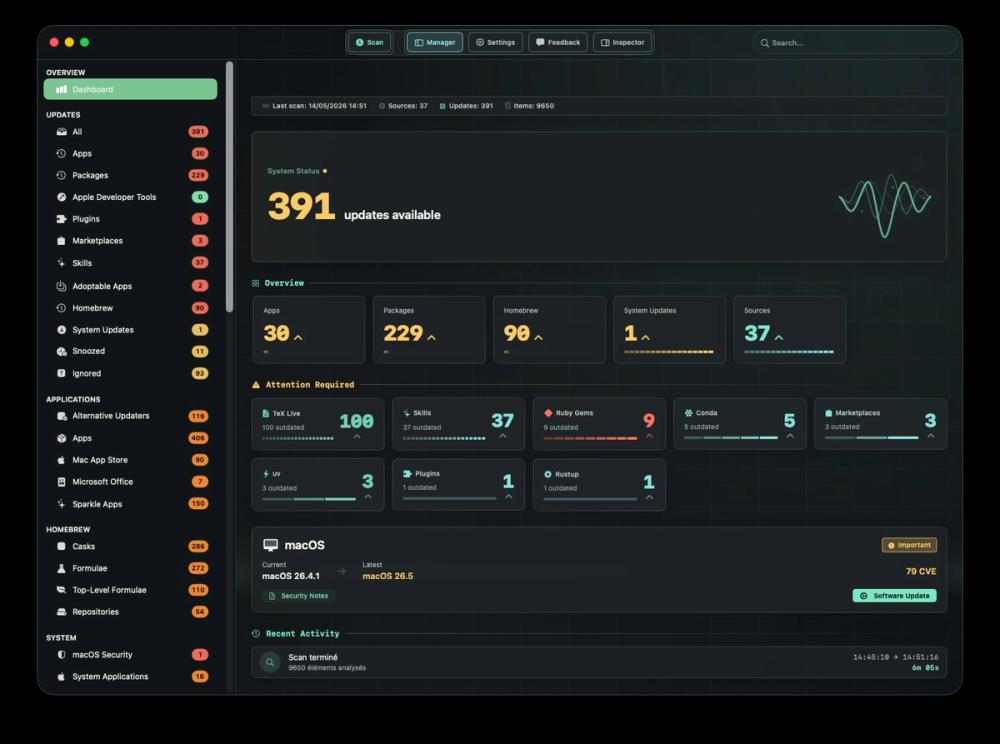
Unified Dashboard Version Tracker presents all tracked applications and packages in a single interface, displaying outdated counts, category breakdowns, and visual charts. The real-time refresh capability ensures the dashboard reflects current system state without manual synchronization.
One-Click Updates Users can update individual packages or trigger bulk updates across all outdated software simultaneously. The interface includes progress tracking and real-time logs, with automatic removal from the outdated list once updates complete.
Comprehensive Source Coverage The application tracks software from 44 distinct sources, including:
- Package managers: Homebrew, Mac App Store, npm, pip, Cargo, Ruby Gems, Go modules, Flutter, Deno, Bun, Composer, conda/mamba/micromamba
- Development tools: Docker, Android SDK, Apple Developer Tools
- Application frameworks: Electron apps via Squirrel, Adobe Creative Cloud
- Alternative updaters: Sparkle, Mozilla, GitHub Releases
- AI tool plugins and marketplaces
- macOS system updates
Security Verification Every tracked application undergoes security checks including:
- Apple code signing verification
- Gatekeeper assessment
- Notarization validation
- CVE database enrichment
- macOS Security Advisory (SOFA) integration
- VirusTotal scanning for Version Tracker releases
Privacy-First Design The application operates without requiring user accounts or cloud synchronization. All scanning and tracking occurs locally on the user's Mac, with no data transmission to external servers.
Multi-Language Support The interface supports English, French, German, Spanish, and Portuguese, making it accessible to international users managing macOS software.
Use Cases
Development Environment Management Developers working with multiple programming languages and package managers can track updates for npm, pip, Cargo, Go, Ruby Gems, and other development tools from a single interface rather than checking each package manager individually.
DevOps and System Administration IT professionals managing multiple Macs or complex software stacks can monitor outdated packages across their infrastructure, ensuring security patches and bug fixes deploy consistently.
Creative Professional Workflows Users relying on Adobe Creative Cloud alongside development tools and system utilities can track updates across creative software, development environments, and productivity apps simultaneously.
Security-Conscious Users Professionals prioritizing software security can leverage CVE checks and notarization validation to verify update safety before installation, reducing exposure to compromised or malicious packages.
Power User Maintenance Mac users with extensive application libraries spanning package managers, direct downloads, and app stores can maintain comprehensive update awareness without manual checking across multiple interfaces.
AI Tool Ecosystem Management Users working with AI development tools, plugins, and marketplace extensions can track updates across rapidly evolving AI software ecosystems alongside traditional development tools.
Pricing
Version Tracker operates on a freemium model with three tiers:
Free Trial
- 7-day trial period
- Full access to all features
- No credit card required to start
Solo Plan
- Scan all 44 sources
- Dashboard and outdated view access
- One-click updates
- CVE security checking
- Scheduled scans
- Coverage for 2 Macs
- All updates included
Team Plan
- Everything in Solo tier
- Coverage for up to 5 Macs
- Suitable for small teams or households
Specific pricing amounts were not visible in source materials. The application is distributed as signed and notarized Apple Silicon and Intel binaries.
User Experience and Support
No Account Required Version Tracker operates entirely locally without cloud accounts, sign-ups, or data synchronization. Users download, install, and run the application immediately.
Interface Language Options The application supports five languages: English, French, German, Spanish, and Portuguese, selectable at runtime.
Update Flexibility Users choose between updating individual packages or triggering bulk updates. Progress tracking provides visibility into update status, while real-time logs offer detail for troubleshooting failed updates.
Automatic Cleanup Successfully updated packages automatically remove themselves from the outdated list, keeping the dashboard focused on remaining work.
Support Channels
- Features documentation on website
- Sources reference documentation
- Blog with updates and guidance
- Multi-language support resources
Technical Details
Platform Requirements
- macOS (Apple Silicon and Intel support)
- Native macOS application (notarized by Apple)
- VirusTotal verified releases
Tracked Sources (44 Total)
Package Managers:
- Homebrew (formulas and casks)
- Mac App Store
- npm (Node.js packages)
- pip (Python packages)
- Cargo (Rust packages)
- Ruby Gems
- Go modules
- Flutter
- Deno
- Bun
- Composer (PHP)
- conda, mamba, micromamba
Development and Runtime:
- Docker (images and containers)
- Android SDK platforms and tools
- Apple Developer command-line tools
Application Distribution:
- Sparkle (auto-update framework)
- GitHub Releases
- Electron apps via Squirrel
- Alternative updaters (Squirrel, Mozilla)
Creative and Professional:
- Adobe Creative Cloud
- AI tool plugins and marketplaces
System:
- macOS system updates
- macOS Security Advisory (SOFA)
Security Architecture
- Local scanning without cloud dependency
- CVE database cross-referencing
- Code signature validation
- Gatekeeper compliance checking
- Notarization status verification
Integration Capabilities
- GitHub Releases monitoring
- Support for custom update channels
Pros and Cons
Pros
- Comprehensive coverage of 44 distinct software sources eliminates need for multiple management tools
- Security-first approach with CVE checking and code signing verification reduces update risk
- Local operation without cloud accounts preserves privacy and avoids data transmission
- One-click bulk updates save time for users maintaining many packages
- Multi-language support improves accessibility for international users
- Real-time dashboard provides immediate visibility into software state
- Automatic outdated list cleanup keeps interface focused
- Signed and notarized releases demonstrate commitment to security best practices
- Free trial allows risk-free evaluation before purchase
Cons
- macOS-only support excludes Windows and Linux users
- Pricing specifics not transparently displayed on public-facing pages
- Solo tier limited to 2 Macs may not suit users with multiple personal machines
- Team tier capped at 5 Macs may require enterprise pricing for larger organizations
- Website lacks detailed documentation on specific features and workflows
- No visible user community or forum for peer support
- Integration with enterprise management tools not documented
- Scheduled scan configuration details not specified
- Dependency on local scanning means no remote management capabilities
FAQ
What is Version Tracker? Version Tracker is a macOS application that monitors software updates across over 100,000 packages from 44 different sources. It unifies update tracking for package managers, development tools, applications, and system components into a single dashboard with security verification.
What macOS versions does Version Tracker support? The application supports both Apple Silicon and Intel Macs. Specific macOS version requirements are not detailed in available materials, but compatibility likely begins with versions supporting the tracked package managers and tools.
Is my data sent to external servers? No. Version Tracker operates with 100% privacy-no user accounts, no cloud sync, and no data transmission to external servers. All scanning and tracking occurs locally on your Mac.
How does security checking work? For every tracked application, Version Tracker verifies Apple code signing, Gatekeeper status, notarization, and cross-references against CVE databases and macOS Security Advisory (SOFA). Version Tracker's own releases are signed, notarized, and checked with VirusTotal.
Can I update everything at once? Yes. The one-click update feature allows bulk updates across all outdated packages simultaneously, with progress tracking and real-time logs. Alternatively, you can update packages individually for more granular control.
What package managers are supported? Version Tracker supports Homebrew, npm, pip, Cargo, Ruby Gems, Go modules, Flutter, Deno, Bun, Composer, and conda/mamba/micromamba environments, among others.
Does Version Tracker handle macOS system updates? Yes. The application tracks macOS system updates alongside third-party packages and applications, providing unified visibility into your entire software stack.
Can I track Adobe Creative Cloud apps? Yes. Version Tracker monitors Adobe Creative Cloud applications through the Adobe updater integration, keeping creative software current alongside development tools.
Is there a free version? Version Tracker offers a 7-day free trial with full feature access. After the trial, a license purchase is required. Specific pricing is available through the website's pricing page or application.
How many Macs can I use with one license? The Solo tier covers 2 Macs. The Team tier extends coverage to 5 Macs. Users needing coverage for more machines should inquire about enterprise licensing.
Does Version Tracker support AI development tools? Yes. The application tracks plugins, skills, and marketplace extensions for AI tools, supporting users working with rapidly evolving AI development ecosystems.
Conclusion
Version Tracker addresses a genuine pain point for macOS power users: the fragmentation of software update management across dozens of sources. For developers, creatives, and IT professionals maintaining complex software environments, the consolidation Value is substantial-eliminating the need to check Homebrew, npm, pip, the Mac App Store, Adobe Creative Cloud, and numerous other sources individually.
The security-first approach distinguishes Version Tracker from simple update notifiers. By verifying code signing, notarization, and CVE status before recommending updates, the application reduces the risk of installing compromised software-a significant concern given the increasing sophistication of supply chain attacks targeting development tools.
The privacy model-local operation without cloud dependency or user accounts-will appeal strongly to security-conscious professionals and those working in regulated environments where data residency matters. This architecture choice sacrifices some convenience (no cross-device sync) for privacy and security benefits.
However, the macOS exclusivity limits the addressable market. Developers working across multiple operating systems will need alternative solutions for Windows and Linux environments. The pricing transparency could also be improved-specific costs are not prominently displayed, requiring users to download the trial or navigate to pricing pages for commitment information.
For the target audience-macOS-based developers, DevOps professionals, and power users-Version Tracker appears to deliver genuine value. The 44-source coverage is genuinely comprehensive, and the security verification goes beyond what most package managers provide natively.
Prospective users should evaluate the trial on their actual workflow to verify:
- Whether all their critical package sources are supported
- If the bulk update behavior matches their risk tolerance
- How the dashboard handles very large software inventories
- Whether scheduled scanning fits their maintenance preferences
For users whose software management currently involves checking multiple interfaces daily, Version Tracker likely justifies its cost through time savings alone. For those with simpler setups, the value proposition depends on whether security verification and unified visibility provide sufficient benefit over free alternatives.