
Introduction
Grid Maker Pro is presented on its public site as a free online photo grid maker aimed at people who want to draw from reference images without strong freehand skills. The page positions the tool around the classic grid method: upload a photo, overlay adjustable grid lines, and work square by square on paper or canvas. Anyone evaluating drawing aids for portraits, scaling references, or classroom practice should confirm how downloads, printing, and usage terms fit their project before relying on it.
Key Features
- Upload reference images by drag-and-drop or file browse; the site mentions common formats such as JPG and PNG.
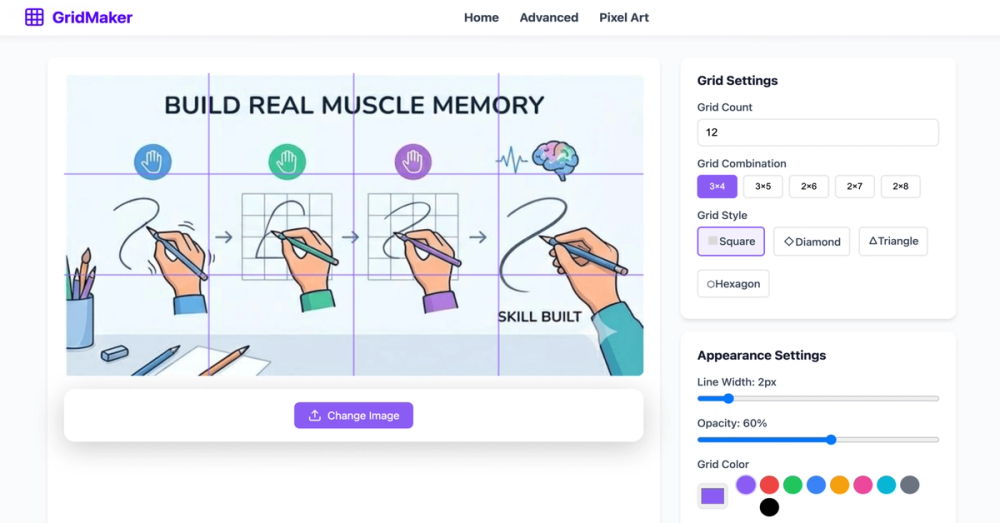
- Overlay customizable grid lines on the reference, with guidance that row and column counts can be tuned (for example, around six columns as a starting point for many subjects).
- Optional grid labels (such as A1, B2, C3) to match positions between the on-screen reference and your drawing surface.
- Controls described on the page include rows and columns, line thickness, grid color, and optional diagonal guides for different visual styles.
- Output oriented toward downloading and printing gridded references so they can sit beside a sketchbook or canvas.
- Marketing copy emphasizes proportion help for complex shapes and scaling a small phone photo to a larger physical drawing when grid counts align.
Use Cases
The public page speaks directly to beginners intimidated by a blank page. By breaking a reference into small squares, the workflow appears to reduce the cognitive load of copying an entire image at once-more like filling one cell at a time than judging the whole composition in a single glance.
Portrait and detailed subject work is another angle the site highlights. Proportions often drift when copying freehand; the grid method, as explained on the page, is meant to keep relative sizes consistent while you transfer what you see in each cell.
Scaling is a third scenario: transferring a small digital photo to a much larger paper or canvas size. The site suggests that matching grid counts between reference and drawing surface makes enlargement more manageable than scaling by eye alone. Readers should still verify print dimensions and square sizing on their own printer or copy shop setup.
Pricing
The site describes the online drawing grid maker as free for personal and educational projects, with no sign-up called out in the main messaging. There is no tiered plan table or paid upgrade path visible in the fetched copy. If you need commercial licensing, team features, or offline software, those details are not spelled out on the primary page and should be checked against current Terms of Service or any updated pricing the operator publishes later.
User Experience and Support
The experience appears browser-based: choose an image, adjust grid settings, then use the gridded reference while drawing offline with pencil and paper. Step-by-step headings on the page walk through upload, grid size, labels, and using the reference on your drawing surface.
Support signals are light in the fetched material. Footer links mention Privacy Policy, Terms of Service, About Us, and Blog, which may carry policies or contact paths, but dedicated help center, live chat, or documentation URLs were not among the pages retrieved in this run. Plan on self-service from on-page FAQs and legal pages unless you find newer support routes on the live site.
Technical Details
Evidence from the single fetched homepage is mostly product-marketing rather than engineering specs. The tool is framed as an online grid maker running in the browser; there is no visible API, plugin, or integration list in the source bundle used here. Image handling is described in terms of JPG/PNG uploads and print-friendly output. For deployment requirements (mobile browsers, offline use, file size limits), confirm directly on Grid Maker Pro when you test with your own photos.
Pros and Cons
Pros
- Clear, beginner-oriented explanation of the grid drawing method with concrete steps.
- Free positioning for personal and educational use according to on-page FAQ-style copy.
- Flexible grid controls (density, color, thickness, labels, diagonal guides) without requiring an account in the main pitch.
- Printable output supports studio and classroom setups where a paper reference sits next to the drawing.
Cons
- Only one site page was available in the preparation fetch, so pricing beyond "free," commercial terms, and support depth are harder to verify from this evidence alone.
- No technical documentation or integration story for teams embedding grids in other apps.
- Heavy marketing language on the page may overpromise "perfect" accuracy; real results still depend on grid setup, print scale, and drawing skill.
FAQ
What is Grid Maker Pro and what problem does it address?
The public page presents Grid Maker Pro as an online tool that overlays a grid on a reference photo so you can copy the image square by square onto paper or canvas. It targets proportion mistakes and overwhelm when drawing complex references, especially for people who do not consider themselves skilled artists.
Who is Grid Maker Pro most useful for?
It appears aimed at beginners, students, and hobbyists practicing the grid method, as well as artists who want a quick digital gridded reference before working traditionally. Professional artists are mentioned as possible users for precise work, but you should judge whether the controls and export quality meet your studio standards.
What can you verify from the site without signing up?
You can read the full how-to flow, feature descriptions (upload, grid density, labels, line styling), format notes for JPG/PNG, and statements that the tool is free for personal and educational use. You can also follow footer links to policy and about pages on the same domain.
How should you choose grid density for a portrait or detailed subject?
The page suggests starting around six columns for many drawings, using fewer squares for simpler subjects and more (roughly eight to ten) when you need finer detail. The right count is a trade-off: smaller squares add precision but can feel tedious if overdone.
Does Grid Maker Pro show paid plans or enterprise options?
The fetched homepage emphasizes a free online tool and does not display subscription tiers or enterprise pricing. Anyone needing commercial use beyond what the FAQ describes should read Terms of Service and contact the operator if terms are unclear.
Can you print the gridded reference for use next to your drawing?
Yes, according to on-page copy: output is designed to be printable so you can place it beside your canvas or sketchbook. Verify paper size, margins, and that printed square proportions match the grid you draw on your paper.
What limitations should you keep in mind before relying on it?
Low-resolution or blurry photos may be hard to read even with a grid. The site is not positioned as automatic tracing-you still draw by hand. Technical limits (max file size, browser support) are not detailed in the evidence used here, so a quick test upload is worthwhile.
Conclusion
Grid Maker Pro, as described on grid-maker.pro, is a browser-based grid overlay tool for traditional drawing practice: upload a reference, tune the grid, optionally label cells, then work offline with pencil and paper. It fits evaluators looking for a no-cost starting point for the grid method, provided they confirm current terms, print setup, and image quality on their own. Visit the live site to try an upload and read Policies and Terms before commercial or classroom adoption at scale.